






















Split Outlook PST Files into Smaller Parts by File Size
Split large Outlook PST files into smaller parts by file size to improve performance, manage mailbox data efficiently, and prevent file size limitations.
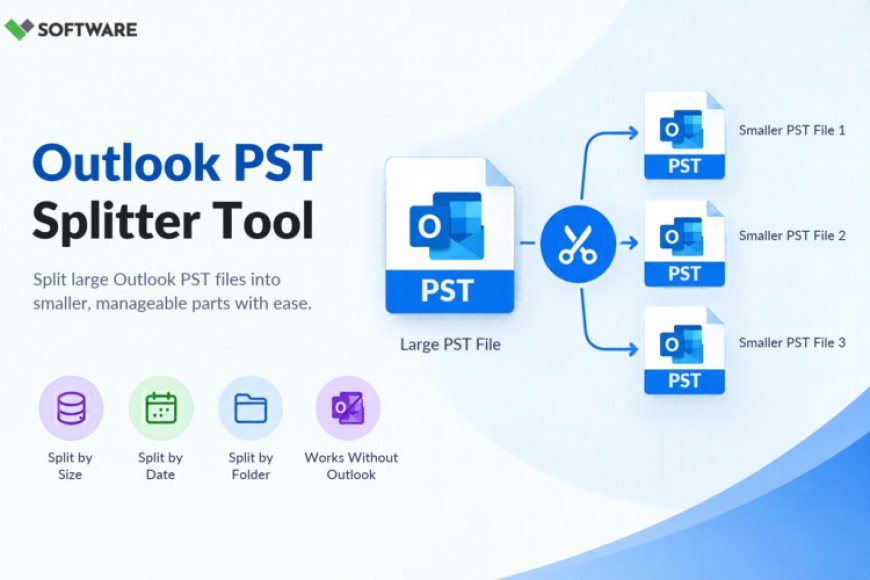
Managing Outlook data becomes increasingly challenging as email volumes grow over time. Microsoft Outlook stores mailbox information in PST (Personal Storage Table) files, which contain emails, attachments, contacts, calendars, tasks, and other mailbox items. While PST files are designed to handle large amounts of data, oversized files can create performance issues, increase the risk of corruption, and make mailbox management more complicated.
One effective solution is to Split PST File by Size. Dividing a large PST into smaller, manageable files helps improve Outlook performance, simplifies backups, and reduces the likelihood of data loss. This article explains why PST files become oversized, the benefits of splitting them by size, and the best practices for maintaining organized Outlook data.
Understanding PST Files
A PST file serves as Outlook's local storage container. It stores mailbox data for POP3 accounts, archived emails, and exported Outlook information. As users send and receive emails daily, the PST file continuously grows.
A typical PST file may contain:
-
Emails and attachments
-
Contacts
-
Calendars
-
Tasks
-
Notes
-
Journal entries
For professionals who use Outlook extensively, PST files can reach several gigabytes in size. While modern versions of Outlook support larger files than older editions, performance can still be affected when files become excessively large.
Why Large PST Files Become a Problem
Many users underestimate the effect of oversized PST files on Outlook's functionality. As mailbox data accumulates, several issues can arise.
Performance Degradation
Large PST files often cause Outlook to:
-
Load more slowly
-
Take longer to search emails
-
Delay folder navigation
-
Freeze during operations
-
Respond sluggishly
These performance issues can affect daily productivity, especially in business environments where quick access to emails is essential.
Increased Risk of Corruption
Although PST files are generally reliable, larger files have a higher chance of becoming damaged due to unexpected system shutdowns, storage errors, or software crashes.
Corruption can lead to:
-
Missing emails
-
Inaccessible folders
-
Synchronization issues
-
Data recovery challenges
Backup Difficulties
Backing up enormous PST files requires:
-
More storage space
-
Longer processing times
-
Greater network bandwidth
Splitting files into smaller segments makes backup operations more efficient and manageable.
Complicated Data Management
Searching through years of email history stored in a single PST file can be cumbersome. Users often struggle to locate archived information quickly.
This is where the option to Split PST File by Size becomes highly beneficial.
What Does It Mean to Split PST File by Size?
When you Split PST File by Size, you divide a large Outlook data file into multiple smaller PST files based on predefined size limits.
For example:
-
20 GB PST may be split into four 5 GB files.
-
15 GB PST may be divided into three 5 GB files.
-
10 GB PST may become five 2 GB files.
Each smaller PST retains its mailbox content while reducing the burden on Outlook.
The process allows users to maintain access to all mailbox information while improving file organization and system performance.
Benefits of Splitting PST Files by Size
Improved Outlook Performance
One of the primary reasons users choose to Split PST File by Size is improved Outlook responsiveness.
Smaller PST files generally result in:
-
Faster startup times
-
Quicker email searches
-
Improved folder access
-
Better overall performance
When Outlook has fewer data records to process within a single file, operations become more efficient.
Reduced Corruption Risk
Large files are often more vulnerable to corruption. By distributing mailbox data across multiple PST files, users reduce the likelihood that a single file failure will impact the entire mailbox archive.
If one file develops issues, the remaining PST files typically remain accessible.
Easier Backup and Recovery
Smaller PST files provide significant advantages during backup and disaster recovery operations.
Benefits include:
-
Faster backup completion
-
Simplified file restoration
-
Easier transfer between systems
-
More efficient storage management
Organizations particularly benefit from these improvements when dealing with multiple mailboxes.
Better Organization
Using smaller PST files allows users to organize email data more effectively.
For example, users can store different PST segments based on:
-
Historical data
-
Departmental communications
-
Project archives
-
Business records
This approach makes information retrieval significantly easier.
Enhanced System Stability
Oversized PST files can place additional demands on system resources.
Splitting large files can help:
-
Reduce Outlook crashes
-
Lower memory consumption
-
Improve processing efficiency
-
Reduce system slowdowns
These advantages are especially noticeable on systems handling large email archives.
Common Scenarios Where PST Splitting Is Useful
Long-Term Email Archives
Many professionals maintain years of correspondence within Outlook. Over time, these archives can become difficult to manage.
Breaking the archive into smaller PST files improves accessibility while preserving data.
Organizational Email Management
Businesses often need to archive completed projects or historical communications separately from active mailboxes.
Splitting PST files provides a practical way to manage these records.
Preparing for Migration
Before migrating Outlook data to another platform or environment, administrators often choose to Split PST File by Size to simplify transfer operations.
Smaller files are generally easier to validate, upload, and import.
Compliance Requirements
Some organizations maintain separate archives for audit and regulatory purposes.
Dividing PST files into smaller segments can assist with retention policies and simplify records management.
Methods to Split PST Files by Size
Manual Archiving
Outlook's built-in Archive feature allows users to move older emails into a separate PST file.
While functional, manual archiving has limitations:
-
Time-consuming for large mailboxes
-
Limited automation
-
Requires user intervention
-
Not ideal for enterprise-scale projects
Professional PST Splitting Software
Dedicated PST management solutions offer advanced splitting capabilities.
These tools commonly allow users to:
-
Specify target file sizes
-
Process large PST files automatically
-
Preserve folder hierarchy
-
Maintain email properties
-
Protect attachments and metadata
Professional software is often preferred when accuracy and efficiency are critical.
Features to Look for in a PST Splitting Solution
When selecting a tool to Split PST File by Size, consider the following features.
Data Integrity Protection
The software should preserve:
-
Email formatting
-
Attachments
-
Sender information
-
Timestamps
-
Folder structure
Flexible Splitting Options
Look for tools that support:
-
Size-based splitting
-
Date-based splitting
-
Folder-based splitting
-
Email count splitting
Bulk PST Processing
Organizations often manage multiple PST files simultaneously. Batch processing can save significant administrative time.
User-Friendly Interface
A simple interface helps users complete splitting operations efficiently without requiring extensive technical expertise.
Outlook Version Compatibility
Ensure compatibility with:
-
Outlook 2021
-
Outlook 2019
-
Outlook 2016
-
Microsoft 365 Outlook
Broad compatibility reduces deployment concerns.
Best Practices for Managing PST Files
After you Split PST File by Size, implementing proper management practices can maximize performance and reliability.
Monitor PST Growth
Regularly review mailbox sizes and prevent files from becoming excessively large.
Archive Older Emails
Move inactive emails to separate PST archives to maintain optimal Outlook performance.
Maintain Backups
Always create backups before performing mailbox maintenance operations.
Verify Split Files
After splitting, check:
-
Folder structure
-
Email accessibility
-
Attachments
-
Search functionality
Verifying results helps ensure successful processing.
Store Files Securely
Use reliable storage solutions and implement access controls to protect archived mailbox data.
Conclusion
As email volumes continue to increase, managing large Outlook data files becomes a critical task for both organizations and individual users. Oversized PST files can negatively affect Outlook performance, complicate backups, increase corruption risks, and make long-term email management more difficult.
Choosing to Split PST File by Size offers a practical and effective solution. By dividing large PST files into smaller, organized segments, users can improve Outlook responsiveness, simplify backups, enhance system stability, and reduce data management challenges. Whether managing years of archived emails or preparing data for migration, splitting PST files by size remains one of the most reliable strategies for maintaining a healthy and efficient Outlook environment.
What's Your Reaction?
 Like
0
 Dislike
0
 Love
0
 Funny
0
 Angry
0
 Sad
0
 Wow
0