


















Difference Between Spam and Phishing: How to Spot Fake Messages Before It’s Too Late
Knowing the Difference Between Spam and Phishing helps you respond appropriately before a suspicious message causes harm.
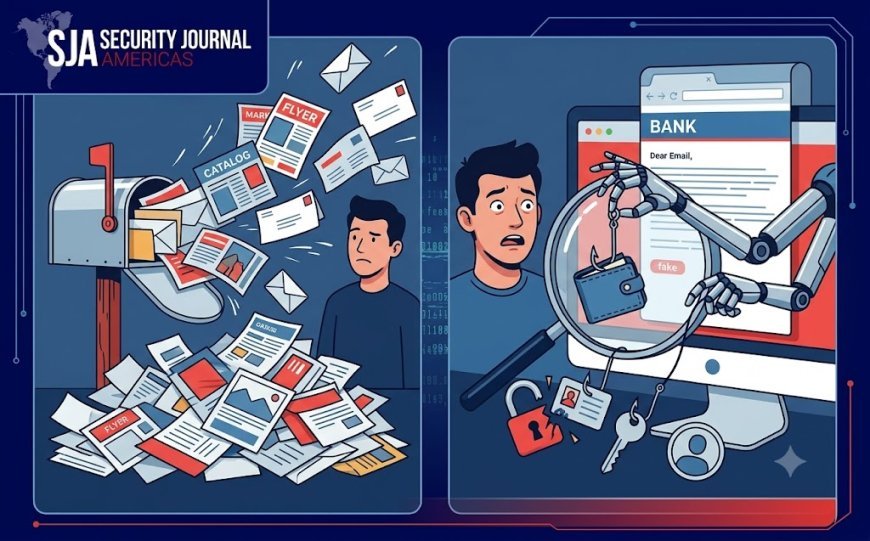
Every day, inboxes and phones fill up with unwanted messages. Some are merely annoying advertisements, while others are carefully designed traps meant to steal money, passwords, or personal information. Understanding the difference between spam and phishing is one of the most important digital safety skills today, because the two may look similar at first glance but carry very different levels of risk.
Spam is usually unwanted bulk communication sent to many people at once. Phishing, on the other hand, is a targeted deception designed to trick you into clicking a malicious link, downloading harmful software, or handing over sensitive details. Knowing how to tell them apart can help you avoid a costly mistake before it is too late.
What Is Spam?
Spam refers to unsolicited messages sent in large volumes, often for marketing, promotions, or questionable offers. Common examples include discount emails from companies you never subscribed to, repeated text messages about prizes, promotional newsletters, and bulk messages advertising products or services.
Spam can be irritating, clutter your inbox, and sometimes expose you to scams, but not every spam message is directly malicious. Many spam emails are simply unwanted marketing. However, spam can still be dangerous when it contains fake offers, misleading claims, or links to unsafe websites.
Typical signs of spam include:
-
Messages from unknown senders
-
Offers that seem too good to be true
-
Generic promotions with little personal detail
-
Repeated messages from the same source
-
Unsubscribing does not stop the messages
-
Emails that arrive in bulk or appear automated
Spam filters have improved significantly, but scammers constantly change tactics to bypass them. That is why users still need to remain alert, even when a message looks harmless.
What Is Phishing?
Phishing is a type of cyberattack in which a criminal pretends to be a trusted person, company, or organization to obtain sensitive information. The attacker may pose as a bank, delivery company, government agency, employer, social media platform, or even a colleague.
The goal is usually to make you act quickly without thinking. A phishing message may claim that your account has been locked, that a payment failed, that suspicious activity was detected, or that you must verify your identity immediately. These messages often create fear, urgency, or excitement so that the recipient clicks before questioning the request.
Phishing can arrive through email, text messages, social media, phone calls, and messaging apps. When it arrives by text message, it is often called “smishing.” When it occurs through voice calls, it may be called “vishing.” Regardless of the channel, the core tactic remains the same: manipulate the recipient into trusting a fake message.
The Difference Between Spam and Phishing
The main difference between spam and phishing is intent. Spam is generally unwanted communication, often commercial in nature. Phishing is deliberately deceptive and designed to steal information, money, or access to accounts.
A spam message may say, “Get 70% off today only.” A phishing message may say, “Your bank account will be suspended in 24 hours unless you verify your details now.” The first is unwanted advertising; the second is an attempt to manipulate you into giving up control of your account.
Why Phishing Is More Dangerous
Spam is inconvenient, but phishing can cause serious harm. If you enter your password on a fake login page, criminals can access your email, banking app, social media, or work accounts. If you provide card details, they may make unauthorized purchases. If you open a malicious attachment, your device could become infected with malware.
Phishing is especially dangerous because modern attacks can look highly convincing. Attackers may copy a company’s logo, use similar colors, imitate official language, and create websites that closely resemble legitimate ones. Some messages even use your name and partial account details, making them appear personal and credible.
Cybersecurity experts consistently warn users to be cautious of messages that demand urgent action, offer unrealistic rewards, or ask for personal or financial information. Legitimate organizations generally do not ask users to confirm passwords, payment details, or identity documents through unexpected messages.
Warning Signs of a Fake Message
Whether a message is spam or phishing, certain warning signs should make you pause.
1. Urgent or Threatening Language
Phrases such as “act immediately,” “your account will be closed,” “final warning,” or “unauthorized login detected” are designed to trigger panic. Attackers want you to react before you have time to verify the message.
Be especially cautious if the message threatens account suspension, legal action, package cancellation, or loss of money unless you respond right away. Urgency is one of the most common phishing tactics.
2. Requests for Sensitive Information
Be suspicious of any message asking for passwords, one-time verification codes, bank details, identity numbers, credit card information, or login credentials.
Real banks and reputable companies do not ask customers to share passwords or full security codes through email or text. If a message requests this information, treat it as a major red flag.
3. Suspicious Sender Address
Check the sender’s email address carefully, not just the display name. A message may appear to come from “Your Bank,” but the actual address could contain unusual characters, misspellings, or a domain that does not match the official organization.
For example, an address like security@yourbank-verify.com should raise concern, even if the message looks professional. Attackers often imitate legitimate businesses by slightly altering an email address.
4. Strange Links
Do not click links in unexpected messages. Instead, hover over a link on a computer to see the actual web address. If the displayed text says one thing but the underlying link points somewhere else, the message may be fraudulent.
Shortened links are also risky because they hide the final destination. If you need to access an account, open your browser and type the official website address yourself rather than using the link in the message.
5. Unexpected Attachments
Attachments can contain malware, especially when they arrive unexpectedly or ask you to enable macros, download a file, or open an invoice you do not recognize. Common risky file types include executable files, compressed archives, and documents that request permission to run content.
If you were not expecting an attachment, do not open it. Verify with the sender through a separate, trusted communication channel first.
6. Poor Grammar and Formatting
Not every fake message contains spelling mistakes, but many still do. Look for awkward sentences, inconsistent fonts, strange spacing, generic greetings such as “Dear Customer,” and missing contact details.
A professional organization usually maintains consistent branding and clear communication. Errors alone do not prove fraud, but combined with other warning signs, they should increase your suspicion.
7. Too Good to Be True Offers
Messages promising large cash prizes, free gifts, lottery winnings, investment returns, or exclusive deals often aim to lower your guard. If an offer sounds unbelievable, it usually is.
Ask yourself a simple question: Why would a stranger give me money, a prize, or an expensive product for little or no effort? In many cases, the answer is that they want your personal information or an upfront payment.
How to Verify a Suspicious Message
When a message seems questionable, do not reply, click, download, or call the number provided in it. Instead, verify independently.
-
Visit the official website by typing its address directly into your browser.
-
Call the organization using the phone number listed on its official website or your account statement.
-
Check your account directly through the official app or website.
-
Contact the supposed sender through a known phone number or email address.
-
Ask the person or colleague directly if the message claims to come from them.
If a message says there is a problem with your bank account, open your banking app yourself or call the bank using its official number. If it claims to be from a delivery company, track the package through the company’s official website. Never rely on contact details included in the suspicious message.
What To Do If You Clicked a Phishing Link
If you already clicked a link, entered information, or downloaded an attachment, act quickly.
-
Disconnect from the internet if you suspect malware.
-
Change your passwords immediately, starting with email and banking accounts.
-
Enable two-factor authentication wherever possible.
-
Check account activity for unfamiliar logins, transactions, or password changes.
-
Contact your bank if you shared financial information.
-
Run a security scan on your device.
-
Report the message to your email provider, workplace IT team, or relevant fraud-reporting service.
-
Delete the message after reporting it.
Fast action can reduce the damage. Even if you are unsure whether anything happened, changing your password and enabling extra security is safer than waiting.
How to Protect Yourself Long Term
Prevention is easier than recovery. Build simple habits that make you less vulnerable to both spam and phishing.
-
Use strong, unique passwords for every account.
-
Turn on two-factor authentication.
-
Keep your device, browser, and apps updated.
-
Avoid using public Wi-Fi for banking or sensitive logins.
-
Do not publish your email or phone number unnecessarily online.
-
Review privacy settings on social media.
-
Be cautious with QR codes from unknown sources.
-
Regularly check bank and card statements for unfamiliar activity.
-
Educate family members, especially children and older adults, about common scams.
These habits will not make you immune to every attack, but they greatly reduce your chances of becoming a victim.
Conclusion
The difference between spam and phishing comes down to purpose and risk. Spam is usually unwanted bulk communication, while phishing is a deliberate attempt to deceive you into revealing sensitive information or taking harmful action. Both deserve caution, but phishing demands immediate attention because it can lead directly to financial loss, identity theft, and account takeover.
Before responding to any unexpected message, pause and ask: Who is sending this? Why am I receiving it? What do they want me to do? If the message pressures you, asks for private information, or includes an unexpected link or attachment, do not interact with it. Verify through official channels instead.
Staying alert is the strongest defense. Security Journal Americas understand the warning signs and take a moment to verify before clicking, you make it much harder for scammers to succeed.
What's Your Reaction?
 Like
0
Like
0
 Dislike
0
Dislike
0
 Love
0
Love
0
 Funny
0
Funny
0
 Angry
0
Angry
0
 Sad
0
Sad
0
 Wow
0
Wow
0