






















How Odoo Can Connect Sales, Inventory, and Accounting in One Workflow
Odoo Sales Inventory Accounting connects sales, stock management, and financial records in one workflow to improve accuracy and business efficiency.
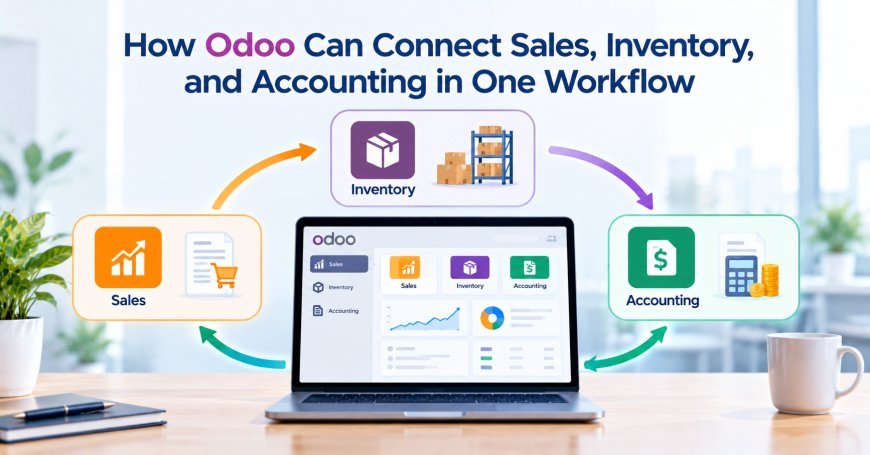
According to a 2024 industry estimate, the global ERP software market continues to grow as companies invest in connected business applications. Gartner also projected worldwide IT spending at approximately $5.26 trillion in 2024. These figures reflect the growing role of technology in business operations. Odoo offers an integrated platform that connects sales, inventory, and accounting. Its applications share data through a common system. This allows a sales order to trigger inventory operations and related financial activities. For example, a customer may order 50 units of a product. The sales team confirms the order in Odoo. The inventory application checks stock and prepares delivery operations. The accounting application then supports invoicing and payment tracking.
This connected process reduces repeated data entry and improves visibility across departments. However, businesses must configure product data, workflows, taxes, and accounting rules correctly. Odoo Consulting Services can help organizations design workflows that match their operational needs. An experienced Odoo Consulting Company can also configure integrations, automate routine tasks, and improve reporting accuracy.
Understanding How Odoo Connects Business Applications
Odoo uses a modular structure that allows businesses to manage several functions within one platform. Each application handles specific tasks while sharing relevant information with other applications.
1. The Sales Application
The Sales application manages quotations, customer orders, pricing, and sales activities. Employees can prepare quotations and send them directly to customers.
When a customer accepts a quotation, the sales team can confirm the order. That action creates the next steps in the configured workflow.
The Sales application can connect with inventory and accounting functions. This helps businesses manage order fulfillment and customer billing without re-entering the same details.
2. The Inventory Application
The Inventory application manages products, warehouses, stock movements, and delivery operations. It tracks quantities received, stored, reserved, and shipped.
When a confirmed sales order requires physical products, Odoo can create delivery operations. The inventory team can then pick, pack, and ship the required items.
Stock availability depends on product settings, warehouse rules, reservations, and routes. Accurate configuration helps prevent incorrect delivery promises.
3. The Accounting Application
The Accounting application manages customer invoices, vendor bills, payments, taxes, and financial reports. It records financial transactions according to the company's accounting configuration.
Sales orders do not always create posted accounting entries immediately. The invoicing policy and business workflow determine when invoices appear.
For example, a business may invoice customers when it delivers products. Another company may invoice based on ordered quantities or agreed milestones.
Odoo supports different billing approaches, depending on the application version and configuration. Businesses should choose a method that matches their contracts and accounting policies.
Connect Sales Orders With Inventory Operations
The workflow begins when a customer requests products or services. Odoo helps sales and warehouse teams work with shared order information.
1. Create Quotations With Accurate Product Data
Sales representatives can create quotations using product records in Odoo. Each product can contain details such as its name, sales price, tax settings, and unit of measure.
Stock-managed products can also use inventory settings and product routes. These settings influence how Odoo handles stock movements and replenishment.
Before sending a quotation, the sales representative should check product availability. Odoo can display useful stock information when the relevant features and permissions support it.
For example, a customer requests 100 office chairs. The sales representative checks available quantities before confirming the delivery date.
If the warehouse has only 70 chairs, the team can review replenishment options. This helps avoid promises that the business cannot meet.
2. Confirm Orders and Create Delivery Operations
When the customer accepts the quotation, the sales team confirms the order. Odoo can create delivery operations according to the product and warehouse configuration.
The inventory team can access the delivery order and prepare the shipment. Staff can review product quantities, locations, and other required details.
After the team validates the delivery, Odoo updates stock quantities. The system also records the completed stock movement.
For example, a confirmed order contains 20 laptops. The warehouse reserves the available units and prepares the delivery.
Once staff validate the shipment, Odoo records the outgoing movement. Sales employees can then review the order's delivery status.
3. Manage Partial Deliveries and Backorders
Businesses may not always have enough stock to fulfill an entire order. Odoo supports workflows for partial deliveries and backorders.
Suppose a customer orders 100 products, but the warehouse holds only 75. The company may ship the available 75 products first.
The warehouse can process the remaining 25 products later. The sales team can monitor the outstanding quantity through the order and delivery records.
This approach improves communication between sales and warehouse employees. It also helps businesses manage customer expectations.
Keep Inventory Data Accurate Across Departments
Inventory accuracy affects sales promises, purchasing decisions, and financial results. Odoo provides tools for tracking stock movements and managing warehouse operations.
1. Track Stock Quantities in Real Time
Odoo updates inventory records as users validate stock operations. These operations may include receipts, internal transfers, deliveries, and inventory adjustments.
Sales employees can use available stock information to make better delivery commitments. Warehouse teams can also identify products that require replenishment.
However, accurate results depend on disciplined operations. Staff must record receipts, validate deliveries, and handle returns correctly.
Businesses should define clear rules for stock movements. They should also restrict inventory adjustments to authorized employees.
2. Manage Multiple Warehouses
Companies with several warehouses need visibility across locations. Odoo can manage multiple warehouses and support configured stock routes.
For example, a company may store products in Delhi and Mumbai. A sales order may require stock from one location or several locations.
Warehouse rules help determine how Odoo handles fulfillment. Businesses can configure replenishment and transfer processes to meet their needs.
Administrators should test warehouse routes before production use. Incorrect routes can cause unexpected transfers or delivery delays.
3. Automate Reordering
Odoo can support replenishment through reordering rules. These rules use configured stock thresholds to help maintain suitable inventory levels.
For example, a business may set a minimum stock level of 25 units. When available quantities reach the defined threshold, Odoo can trigger a replenishment process.
The exact action depends on the product route and reordering configuration. The system may create a purchase request or another replenishment operation.
Businesses should calculate reorder levels using demand, supplier lead times, and storage limits. Poor settings can create excess stock or frequent shortages.
Connect Sales With Customer Invoicing
Sales and accounting need consistent information about orders, prices, quantities, and taxes. Odoo connects these details through its sales and invoicing workflows.
1. Generate Invoices From Sales Orders
Odoo can create customer invoices from confirmed sales orders. The invoicing policy determines which quantities or milestones qualify for billing.
Under an ordered-quantity policy, a business may invoice based on ordered quantities. Under a delivered-quantity policy, invoicing depends on delivered quantities.
For example, a customer orders 50 printers. The business chooses to invoice only after delivery.
After staff validate the shipment, the invoicing process can use the delivered quantity. This reduces the risk of billing for goods that have not shipped.
Businesses should confirm the invoicing policy before using automated workflows. The selected policy must match customer agreements and financial controls.
2. Apply Taxes and Accounting Rules
Product and customer settings influence invoice details. These settings may include taxes, payment terms, fiscal positions, and income accounts.
Odoo uses the company's accounting configuration to determine the relevant financial treatment. Correct setup helps maintain consistent invoice records.
For example, a company may sell products across different tax regions. Fiscal positions can help apply the appropriate tax mapping when configured correctly.
Accountants should review tax rules before activating automated invoicing. They should also test credit notes, refunds, and tax reporting.
3. Track Invoice Status
Odoo allows finance teams to review invoice status and outstanding balances. Depending on the configuration, invoices may remain in draft until an authorized user confirms them.
After posting an invoice, the system records the relevant accounting entries. The finance team can then register payments and reconcile them against invoices.
Sales representatives can use invoice status to support customer conversations. They can identify unpaid invoices and coordinate with finance when needed.
Connect Inventory Movements With Accounting
Inventory and accounting must reflect business activity accurately. Odoo can connect stock valuation with financial records through its configured valuation methods.
1. Understand Stock Valuation
Stock valuation determines how a company measures the value of inventory. Odoo supports valuation approaches such as standard price, average cost, and FIFO, subject to product and configuration requirements.
Each method can produce different inventory values and cost calculations. Businesses should select a method that fits their accounting policies and local requirements.
For example, a company purchases 100 units at ₹500 each. The purchase creates an inventory value of ₹50,000 before other relevant costs.
If the company later sells 20 units, the inventory value and cost of goods sold depend on the chosen valuation method. The system uses configured rules to calculate the related values.
2. Configure Automated Inventory Valuation
Odoo supports automated inventory valuation for compatible product and accounting configurations. Stock movements can create accounting entries when the relevant settings apply.
This helps reduce the need for separate manual inventory adjustments. Finance teams can review stock-related accounting records alongside operational movements.
However, automated valuation requires correct accounts and product categories. Businesses must also confirm how their Odoo version handles valuation entries.
Test receipts, deliveries, returns, and inventory adjustments before relying on automated accounting. Compare system entries with the organization's accounting policies.
3. Review Cost of Goods Sold
Cost of goods sold represents the cost assigned to products that a company sells. It helps businesses calculate gross profit and evaluate product performance.
For example, a company sells a product for ₹1,000. Its recorded cost equals ₹600 per unit.
The gross profit before other expenses equals ₹400 per unit. Accurate cost settings help the company understand this margin.
The exact accounting entries depend on the valuation method and configuration. Finance teams should verify these entries during implementation.
Automate the Full Sales-to-Cash Workflow
The sales-to-cash process covers customer orders, delivery, invoicing, and payment collection. Odoo connects these stages through linked business records.
1. Follow the Complete Workflow
A typical product sales workflow includes these steps:
-
The sales representative creates a quotation.
-
The customer accepts the quotation.
-
The sales team confirms the order.
-
Odoo creates the required delivery operation.
-
The warehouse prepares and validates the shipment.
-
The accounting team creates or reviews the customer invoice.
-
The customer submits payment.
-
Finance records and reconciles the payment.
-
The team reviews the final order and invoice status.
The exact sequence depends on the company's settings and invoicing policy. Some businesses invoice before delivery, while others invoice afterward.
The key benefit comes from connected records. Employees can follow the order without repeatedly entering the same information.
2. Reduce Manual Data Entry
Disconnected systems often require employees to copy order details into accounting software. Manual entry increases workload and introduces avoidable errors.
Odoo can use shared customer, product, and order records across applications. This reduces repeated entry for supported workflows.
For example, a sales representative enters the customer address once. The warehouse and accounting teams can access that information through the relevant records.
Businesses should still validate important fields. Incorrect customer details or product prices can affect several connected processes.
3. Improve Payment Tracking
Odoo can connect invoices with payment records and reconciliation workflows. Finance teams can review outstanding balances and identify overdue accounts.
Payment terms help define when customers should pay. Automated reminders may also support collection activities when properly configured.
For example, a company offers customers 30-day payment terms. The finance team can monitor invoices approaching their due dates.
This improves visibility into receivables and helps employees follow up on unpaid balances.
Use Reports to Improve Business Decisions
Connected data gives managers a clearer view of sales, inventory, and financial performance. Odoo provides reports across these business areas.
1. Review Sales Performance
Sales reports help managers review revenue, order volumes, and product performance. They can compare results across customers, sales teams, and time periods.
Managers can use this information to identify strong products and changing demand. They can also compare quotations with confirmed orders.
Reliable reporting depends on accurate records. Teams should correct duplicate customers, incomplete orders, and inconsistent product details.
2. Monitor Inventory Performance
Inventory reports help businesses review stock levels, movements, and replenishment needs. They can identify slow-moving products and potential shortages.
For example, a company may discover that certain products remain in storage for several months. The purchasing team can then adjust future orders.
Managers should also monitor stock differences and delivery delays. These issues may indicate problems with warehouse procedures or demand planning.
3. Review Financial Performance
Accounting reports provide information about income, expenses, receivables, and inventory values. Managers can use these reports to evaluate profitability and cash flow.
Sales and inventory data can support more detailed analysis. For example, managers can compare product sales with recorded costs.
However, reliable financial reports require correct accounting configuration and regular reconciliation. Businesses should review reports with qualified accounting staff.
Common Problems and How to Avoid Them
An integrated workflow can still produce errors when configuration or business processes lack proper controls.
1. Inconsistent Product and Customer Data
Duplicate customer records can complicate invoicing and payment tracking. Inconsistent product codes can also affect purchasing and inventory operations.
Create clear naming rules and unique identifiers. Clean existing records before importing data or enabling automation.
2. Incorrect Tax and Accounting Settings
Wrong tax mappings or income accounts can create inaccurate financial records. Review accounting settings before generating live invoices.
Test different customer types, product categories, and transaction scenarios. Confirm that reports match the expected results.
3. Poor Warehouse Configuration
Incorrect routes and reordering rules can create unnecessary transfers or purchasing activity. Review warehouse settings against actual business processes.
Test receipts, deliveries, returns, and inter-warehouse movements. Train employees to follow the approved procedures.
4. Limited User Access Controls
Users should only access functions needed for their jobs. Broad permissions can increase the risk of incorrect changes.
Assign roles based on business responsibilities. Review access when employees change positions or leave the company.
5. Lack of Employee Training
Employees may skip steps or use incorrect workflows when they lack training. This can affect inventory, sales, and accounting records.
Provide practical training for each department. Document important procedures and assign responsibility for resolving errors.
How Odoo Consulting Services Can Help
Connecting sales, inventory, and accounting requires more than installing applications. Businesses must configure workflows, data rules, access rights, and accounting settings.
Odoo Consulting Services can help companies review their processes before implementation. Consultants can identify gaps and design workflows that fit operational requirements.
An experienced Odoo Consulting Company can support:
-
Business process analysis
-
Sales and inventory workflow configuration
-
Accounting and tax setup
-
Product and customer data migration
-
Warehouse and replenishment configuration
-
Automated invoicing and payment workflows
-
User access and approval rules
-
Report design and dashboard configuration
-
Testing, training, and ongoing support
Consultants should work closely with sales, warehouse, and finance teams. This ensures that the configuration supports real business needs.
They should also test critical scenarios before production deployment. These tests should include partial deliveries, returns, refunds, tax differences, and payment reconciliation.
A well-planned implementation reduces avoidable errors. It also gives employees a clear process for managing daily transactions.
Conclusion
Odoo connects sales, inventory, and accounting through shared records and linked workflows. A confirmed sales order can trigger delivery operations and support customer invoicing. Accurate inventory settings help teams manage stock and fulfillment. Correct accounting rules help finance teams record invoices, payments, and inventory values.
Businesses should configure product data, warehouse routes, taxes, and valuation methods carefully. They should also test workflows and train employees before full deployment. Odoo Consulting Services can help organizations design a reliable connected workflow. A skilled Odoo Consulting Company can also support configuration, data migration, and future improvements. With the right setup, Odoo helps businesses reduce repeated data entry, improve operational visibility, and make informed decisions. The result is a more connected process from customer order to payment collection.
What's Your Reaction?
 Like
0
Like
0
 Dislike
0
Dislike
0
 Love
0
Love
0
 Funny
0
Funny
0
 Angry
0
Angry
0
 Sad
0
Sad
0
 Wow
0
Wow
0