
























How to Recognise Fake Fairplay24 Websites and Suspicious Login Pages
Learn how to recognise fake Fairplay24 websites, identify suspicious login pages, protect your account details and follow simple steps for safer online access.
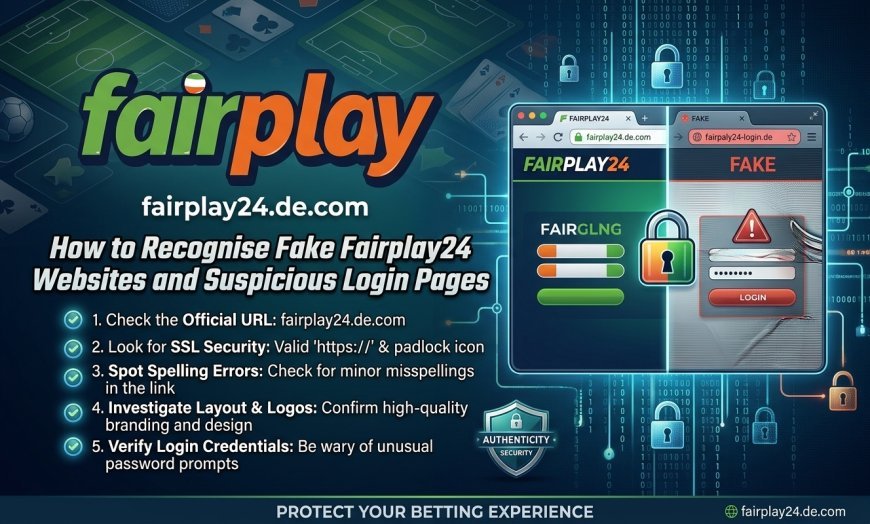
Finding the correct website matters whenever you access an online platform. With fake pages and misleading links appearing across the internet, users should take a moment to check a website before entering personal information. Fairplay24 users can reduce avoidable security risks by learning how to identify suspicious pages, examine website details and recognise unusual login requests. A few simple checks can help protect account information and prevent unnecessary access problems.
1. Check the Website Address Carefully
The website address is one of the first things you should examine. Fake websites often use domain names that look similar to genuine ones. However, small changes can make a significant difference.
For example, a suspicious page might include extra letters, unusual characters, additional words or a different domain extension.
Before proceeding, check these details:
-
Compare the domain with a previously verified website address.
-
Look for spelling mistakes or unexpected characters.
-
Avoid links with strange combinations of letters and numbers.
-
Check whether the address changes unexpectedly after opening the page.
Most importantly, do not assume that a familiar-looking name automatically confirms a website's authenticity.
2. Look for an HTTPS Connection
A secure connection is another useful detail to examine. Websites using HTTPS encrypt information exchanged between your browser and the website. You can usually identify this connection through the padlock symbol in the browser's address bar.
However, HTTPS does not guarantee that a website is genuine. Fraudulent websites can also obtain security certificates.
Therefore, treat HTTPS as one security indicator rather than proof of authenticity. Always examine the domain name and other website details before sharing personal information.
3. Recognise Suspicious Login Pages
A login page should display clear information and provide a straightforward way to access an account. In contrast, fake pages may contain unusual designs, misleading messages or unnecessary requests.
When checking a Fairplay24 login page, look for warning signs such as:
-
Poor spelling, grammar or inconsistent formatting.
-
Unfamiliar pop-ups asking for personal information.
-
Unexpected requests for passwords or verification codes.
-
Buttons that redirect you to unrelated websites.
-
Messages creating urgency, such as threats of immediate account closure.
Additionally, avoid entering information if the page behaves differently from the website you previously verified.
4. Be Careful With Unverified Links and Messages
Fake website links do not always appear on search engines. They can also arrive through emails, text messages, social media posts and messaging applications.
For instance, a message might claim that your account needs immediate verification or that you must follow a new link to restore access.
Instead of opening such links immediately, follow these precautions:
-
Check who sent the message.
-
Avoid clicking shortened or unfamiliar URLs.
-
Do not trust unexpected messages simply because they include a familiar brand name.
-
Visit a previously verified website address directly through your browser.
These steps help reduce the chances of landing on an imitation page.
5. Protect Your ID and Login Details
Your login information should remain private. Never share your password or one-time verification code with another person, even if they claim to represent customer support.
If you use the Fairplay24 app, download it only through a verified source and review its requested permissions. Unnecessary access to contacts, messages or other personal information deserves attention.
Furthermore, follow these basic security practices:
-
Create a strong, unique password.
-
Avoid saving passwords on shared devices.
-
Log out after using an account on a public computer.
-
Keep your browser and device software updated.
-
Change your password if you suspect unauthorised access.
If you plan to use the Fairplay24 register process, first confirm that the page belongs to the correct website.
6. What to Do If You Find a Fake Website
If a page appears suspicious, stop interacting with it. Do not enter account information, download files or respond to unexpected requests.
If you have already shared sensitive details, take action promptly:
-
Close the suspicious page.
-
Change your password through a previously verified website.
-
Review your account activity for unfamiliar access.
-
Contact the platform's support team through independently verified contact details.
-
If you shared payment information, contact your payment provider and follow its security advice.
Also, report suspicious websites to the relevant browser, hosting provider or appropriate cybercrime authority.
Conclusion
Recognising fake websites requires attention to small details. Domain spelling, secure connections, login page behaviour and unexpected messages can all provide useful warning signs. Users should verify website addresses independently and keep their account information private. Although no single check guarantees authenticity, combining these practices can make online access safer and help prevent avoidable security problems.
What's Your Reaction?
 Like
0
 Dislike
0
 Love
0
 Funny
0
 Angry
0
 Sad
0
 Wow
0