

























How to Integrate Electronic Medical Records (EMR) into Telemedicine Apps in the UAE
Learn how telemedicine apps can connect with EMR systems through secure workflows, patient matching and healthcare interoperability.

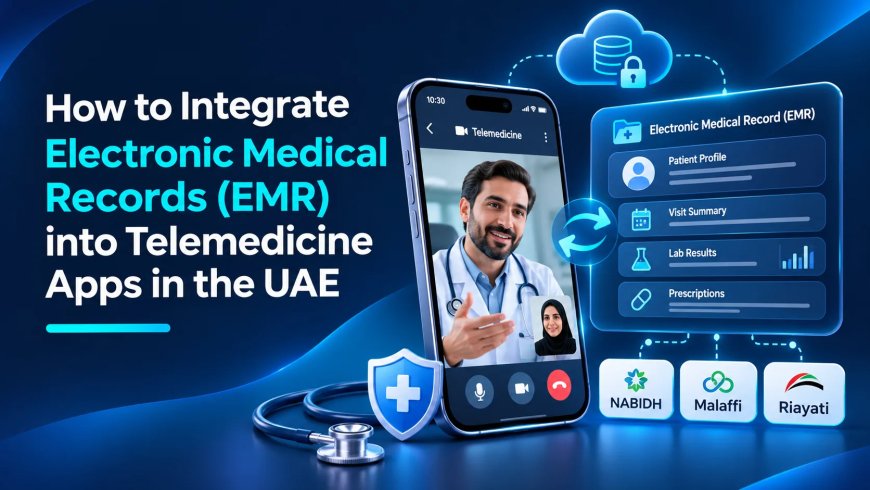
A telemedicine app can support booking and video consultations, but clinicians also need access to relevant patient information. Integrating the app with an electronic medical record (EMR) system can connect scheduling, identity, consultation documentation and follow-up workflows. Done well, it reduces duplicate data entry and helps clinicians work with a more complete record.
EMR integration is not simply a technical connection between databases. It affects clinical safety, patient consent, data quality, access permissions and healthcare operations. In the UAE, providers must assess applicable federal and emirate-level health information requirements before deciding how data can be stored, exchanged or accessed.
Map the clinical workflow
Document the patient journey: registration, identity verification, appointment booking, pre-consultation information, clinician review, consultation, documentation and follow-up. Identify which system owns each record and when information is created or updated. The telemedicine app may manage video sessions while the EMR remains the authoritative clinical record.
Define how cancellations, rescheduled appointments, incomplete consultations and amended notes are handled. A draft note should never be presented as a final signed record.
Key integration points
Patient identity requires a controlled matching process. Avoid matching on name alone because different patients can have similar names or spellings. Appointment data should include clinician, service, time and status. Use time-zone-aware timestamps and prevent duplicate bookings.
Where authorised, clinicians may need relevant history, allergies, medication lists and previous notes. Display the source and last update time so the clinician can judge whether information is current. Define how consultation notes are created, saved, signed and amended. Prescriptions and test requests should follow the provider's approved clinical workflow.
Patients may need access to summaries or documents through a portal. Apply identity verification and permissions before showing records.
Interoperability and architecture
The architecture may include the telemedicine app, API gateway, integration engine, EMR, identity service and appointment scheduler. Use standards supported by the healthcare organisation and vendors. HL7 or FHIR may be suitable, but confirm actual implementation profiles and vendor support rather than assuming compatibility.
An integration layer can transform messages, validate data, manage retries and monitor delivery. Use unique correlation IDs to trace updates across systems. Plan for partial failure: a video call may continue during an analytics outage, but a failed clinical note save may require a different workflow.
A related overview of product scope and cost considerations is available in this telemedicine app development cost guide.
Security and privacy
Apply role-based access so clinicians, administrators, support staff and patients see only the information required for their roles. Use strong authentication, secure sessions, encryption and audit logging. Record who accessed or changed a record and when, while avoiding unnecessary copies of clinical content in logs.
Patient identity and consent workflows should follow provider policy. Define retention, backup, incident response and vendor access procedures before launch.
UAE health-data considerations
UAE Federal Law No. 2 of 2019 addresses the use of ICT in health fields, including confidentiality and security of health information. Applicable rules may also include executive regulations, emirate-level standards, data-sharing policies and requirements relevant to the provider's licence and location. Dubai Health Authority publishes policies and standards covering digital health and telehealth.
Healthcare providers planning connected-care platforms can also review healthcare app development.
Assess where data is hosted, who can access it, whether data is transferred outside the UAE and which safeguards apply. Involve the provider's legal, compliance, privacy and information-security teams before selecting hosting or integration arrangements.
Testing and clinical validation
Test patient matching, duplicate records, conflicting updates, appointment changes, missing data, access denial, expired sessions and failed message delivery. Verify that clinicians see the correct patient and that notes are saved to the correct record.
Run workflow testing with representative staff and confirm downtime procedures. After launch, monitor integration latency, failed messages, unmatched records and data-quality exceptions.
Conclusion
Interoperability, data quality and downtime
Interoperability succeeds when systems agree on meaning, not merely when they can exchange messages. A medication entry, allergy, encounter or appointment needs a consistent identifier, code system, timestamp and source. If two systems represent the same concept differently, an integration can create misleading or duplicate records. Clinical teams should review mappings and decide which system is authoritative for each data type.
Standards such as HL7 and FHIR can support structured exchange, but naming a standard does not guarantee plug-and-play compatibility. Implementations may use different profiles, terminology services, extensions and authentication methods. Before development, obtain the provider's interface documentation and confirm which resources or messages are supported. Test with representative, de-identified data and involve clinical users in validating the displayed result.
Downtime procedures deserve the same attention as the normal workflow. If the EMR or integration engine is unavailable, staff need to know whether a consultation can proceed, how notes are captured safely and how records are reconciled later. Avoid uncontrolled local copies of patient data. Define retry rules, duplicate detection and manual review for conflicts. Monitoring should show failed messages, delayed updates and unmatched patients so that issues can be resolved before they affect care.
EMR integration can connect virtual care with the provider's clinical record and operational systems. Start with clinical workflows and data ownership, then establish secure interoperability, identity controls and tested downtime procedures.
What's Your Reaction?
 Like
0
 Dislike
0
 Love
0
 Funny
0
 Angry
0
 Sad
0
 Wow
0