






















IPTV Parental Controls: How Families Can Create a Safer Viewing Setup
Rapid IPTV Sweden provides IPTV subscription options for viewers looking to stream entertainment over the internet in Sweden.
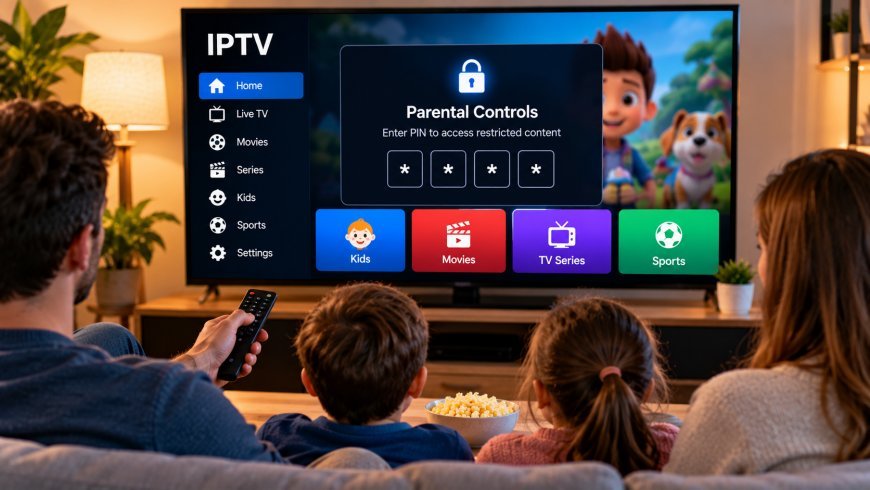
IPTV gives households access to a wide range of television content through internet-connected devices. For families, this flexibility can be useful because live television, films, series, and other entertainment can often be watched on Smart TVs, tablets, smartphones, computers, and streaming devices.
At the same time, a larger content library can make parental controls more important. Families may want to limit certain categories, protect application settings, or make it easier for children to find age-appropriate content.
A well-configured IPTV setup can help parents create a more organized and controlled viewing environment.
Why Parental Controls Matter
Different members of a household may have very different viewing preferences.
Adults may watch news, sports, films, or international programming, while children may mainly use family or entertainment categories.
Without organization, younger viewers may need to browse through a large channel or video library to find suitable content.
Parental-control tools can help by restricting selected areas of an IPTV application or requiring a PIN before certain content can be opened.
Check What Your IPTV Player Supports
Parental controls are often managed through the IPTV player rather than the subscription itself.
Different applications provide different features.
Depending on the player, parents may be able to:
-
Lock individual channels
-
Protect categories with a PIN
-
Restrict settings
-
Hide selected content
-
Protect account information
-
Limit access to adult sections
Not every IPTV player offers all of these options, so families should review the available settings before choosing an application.
Create a Strong Parental-Control PIN
If the IPTV player supports PIN protection, choose a code that children cannot easily guess.
Avoid simple combinations such as:
-
0000
-
1111
-
1234
-
Birth years
-
Repeated numbers
Parents should also avoid using the same PIN as important banking or account credentials.
A parental-control code only needs to protect the entertainment settings, so it should be unique and easy for the responsible adult to remember.
Organize Channels Into Favorites
Parental controls are useful, but good organization can also improve the experience.
Many IPTV players allow users to create favorite lists.
Parents can place commonly watched family channels into a simple favorites section so children do not need to search through the entire channel list.
This can make navigation easier on Smart TVs where scrolling through hundreds of entries may be inconvenient.
Use Categories Carefully
IPTV applications often organize content into sections such as:
-
Live TV
-
Sports
-
Movies
-
Series
-
Family
-
Kids
-
Documentaries
-
International channels
Parents should review these categories rather than assuming every item inside a family-labelled section is appropriate for every child.
Content classifications and availability can vary between services.
When researching IPTV subscriptions, device compatibility, streaming information, and household viewing options in Sweden, families may also come across Rapid IPTV Sweden while comparing services and setup choices.
Combine IPTV Controls With Device Controls
The IPTV player is not the only place where restrictions can be configured.
Many Smart TVs, smartphones, tablets, and streaming devices include their own parental-control features.
These device-level settings may allow parents to:
-
Restrict app installations
-
Require approval for purchases
-
Set screen-time limits
-
Block selected applications
-
Control account changes
Using both the IPTV application's controls and the device's built-in settings can create a more complete setup.
Parental Controls on Smart TVs
Smart TVs are often the main screen used by the entire household.
Because several people share the same device, it is worth checking both the television settings and the IPTV player's options.
Some televisions allow parents to lock applications or inputs. Others provide profile-based restrictions.
If a child frequently uses the television independently, parents should also make sure that application-store purchases or new installations require authorization where possible.
Parental Controls on Tablets and Smartphones
Mobile devices can be more difficult to supervise because children may use them away from the main living area.
Fortunately, modern phones and tablets often provide detailed family settings.
Parents may be able to limit:
-
Daily screen time
-
Application access
-
Purchases
-
Website access
-
Content ratings
These settings can work alongside IPTV player restrictions.
It is also useful to disable unnecessary account changes so a child cannot simply remove restrictions.
Create Separate User Profiles When Available
Some streaming applications and devices support separate profiles.
This can be helpful in households where adults and children use the same device.
A child profile may contain only appropriate apps and viewing categories, while the adult profile retains full access.
Not every IPTV player provides profile support, but device-level profiles can sometimes achieve a similar result.
Protect IPTV Account Information
Children do not need access to subscription credentials.
M3U URLs, usernames, passwords, and portal information should be stored securely.
These details may provide direct access to the IPTV account, so parents should avoid leaving them visible in notes, screenshots, or messaging applications that children can access.
If credentials are saved inside the IPTV player, protect the application's settings when possible.
Review Content Regularly
Parental controls should not be configured once and then forgotten.
Content libraries, applications, and device software can change over time.
Parents should periodically check:
-
Whether restrictions still work
-
Whether new categories have appeared
-
Whether the IPTV player has changed its settings
-
Whether children have installed new applications
-
Whether device updates have affected existing controls
A quick review every so often can help prevent unexpected changes.
Keep Apps and Devices Updated
Security and parental-control features may improve through software updates.
Keeping the Smart TV, streaming device, IPTV player, smartphone, or tablet updated can help maintain compatibility and reduce technical problems.
Updates should preferably come from official device stores or trusted developer sources.
Avoid downloading unknown IPTV applications simply because they promise additional features.
Explain the Rules to Children
Technical restrictions work better when children also understand the household rules.
Parents can explain:
-
Which apps they may use
-
What types of content are appropriate
-
How much screen time is allowed
-
When they should ask an adult for help
-
Why passwords and account details should remain private
Clear rules can reduce the need for overly complicated technical restrictions.
Avoid Relying Only on Channel Names
A channel or category name does not always provide enough information to determine whether content is suitable for a child.
Programming can change throughout the day.
An Electronic Program Guide, or EPG, may help parents check what is currently playing and what is scheduled next.
When available, program descriptions can also provide useful context.
Screen Time Is Part of the Setup
Parental controls are not only about blocking content.
Families may also want to manage how long children spend watching television.
Device-level screen-time settings can be helpful, particularly on tablets and smartphones.
Parents can also create simple household routines, such as limiting entertainment during homework hours or keeping devices out of bedrooms at night.
The right approach depends on the family.
Check App Store Restrictions
Children may sometimes install another media application if they cannot access content through the existing player.
For this reason, parents should review app-store permissions.
Requiring a password or parental approval before new applications can be installed helps maintain control over the device.
This is especially useful on Android-based televisions, tablets, and streaming boxes where many applications are available.
What to Do If a PIN Is Forgotten
Before enabling parental controls, check whether the IPTV player provides a recovery method.
Some applications allow PIN resets through account settings, while others may require reinstalling or reconfiguring the application.
Parents should store the PIN securely rather than relying on memory alone.
Avoid placing it somewhere obvious near the television.
Test the Restrictions Yourself
After configuring parental controls, test them.
Try opening the restricted category, changing settings, installing an application, or switching profiles.
This confirms that the controls behave as expected.
Testing is especially important after a major device or application update.
Final Thoughts
IPTV can provide flexible entertainment across many household devices, but families should take time to configure appropriate viewing controls.
A good family setup may combine IPTV player restrictions, device-level parental controls, strong PIN protection, favorite lists, separate profiles, and regular review of available content.
Parents do not need to make the system complicated. The goal is simply to make everyday viewing easier to manage while keeping sensitive settings and unsuitable content less accessible to younger viewers.
What's Your Reaction?
 Like
0
Like
0
 Dislike
0
Dislike
0
 Love
0
Love
0
 Funny
0
Funny
0
 Angry
0
Angry
0
 Sad
0
Sad
0
 Wow
0
Wow
0