


























How to Automate eBay: What You Can and Cannot Automate
eBay automation explained: what you can automate safely, what eBay bans, the best free Seller Hub tools and where an eBay virtual assistant still fits.

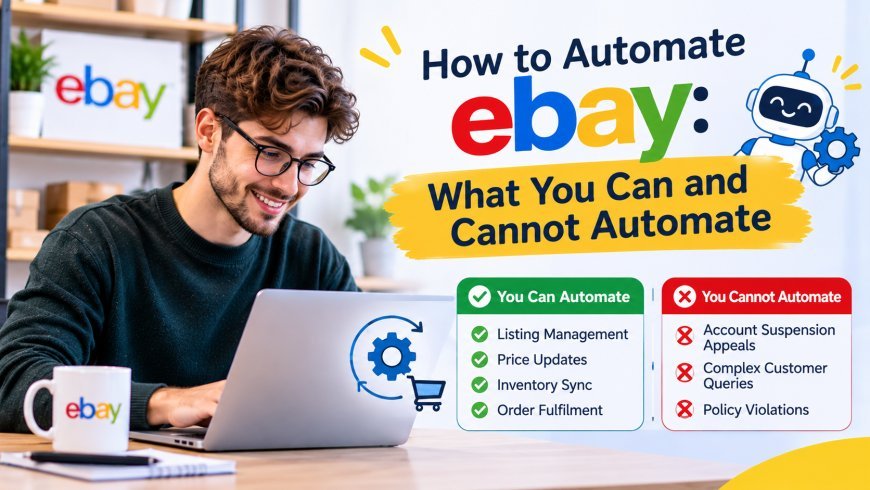
eBay automation works best on the repetitive back-office jobs: drafting listings with AI, sending offers, leaving feedback, syncing stock, uploading tracking, repricing and reporting. eBay builds many of these tools into Seller Hub, and approved third-party apps handle the rest through eBay's official APIs. What you can't automate safely is anything that accesses eBay without permission, such as scrapers, bots and AI buying agents, or anything that breaks policy, like auto-ordering from Amazon to fulfill eBay sales. Judgment calls still need a human: final listing accuracy, tricky buyer disputes and pricing strategy.
The simple rule: automate the tasks, not the decisions. Your account is on the line for every listing and message, whether you or a tool produced it.
What You Can and Cannot Automate on eBay
|
Task |
Automate? |
How |
|---|---|---|
|
Listing drafts |
✅ Yes, with review |
eBay's AI listing tools, bulk listing, listing software |
|
Offers to buyers |
✅ Yes |
Seller Hub automated offers and Best Offer rules |
|
Feedback for buyers |
✅ Yes |
Automatic feedback settings |
|
Stock sync across channels |
✅ Yes |
Inventory software via eBay's APIs |
|
Tracking upload and order import |
✅ Yes |
Shipping and order management apps |
|
Repricing |
✅ Yes, with limits |
Approved repricing tools; set price floors |
|
Common buyer questions |
⚠️ Partly |
AI-drafted replies you approve |
|
Returns and disputes |
⚠️ Partly |
Return rules; humans for cases |
|
Scraping eBay or competitor listings |
❌ No |
Prohibited without permission |
|
Auto-ordering from Amazon or Walmart for dropshipping |
❌ No |
Breaks eBay's dropshipping policy |
|
AI bots placing orders |
❌ No |
Banned under eBay's User Agreement |
eBay's Built-In Automation Tools (Free)
Start here before paying for anything. eBay has quietly automated a lot of seller work:
- AI listing creation. eBay's "magical listing" tool drafts titles, categories and item specifics from a photo. With magical bulk listing, sellers can upload product image batches for eBay to generate draft listings. You review and publish.
- Automated offers. You can set rules so that eBay will automatically send offers to interested buyers when your listings, including newly created ones, match the rules you've set. Offers can run for up to 150 days.
- Best Offer rules. Set auto-accept and auto-decline thresholds so lowball offers never reach your inbox.
- Automatic feedback. In your preferences you can choose when feedback should be left, either after the buyer pays or after they leave positive feedback.
- eBay automated feedback for you. Separately, eBay now adds positive feedback for eligible orders. In the UK, it's added 7 days after tracking confirms successful delivery, if the item arrived on time and the buyer hasn't left feedback. That makes tracking on every order part of your automation strategy.
- AI-drafted buyer replies. An opt-in tool drafts suggested replies to common buyer questions about item specifics or shipping using information already in the listing.
Ecommerce Automation Tools Beyond eBay
Once you sell on more than one channel, ecommerce automation software fills the gaps eBay's own tools leave. The safe ones connect through eBay's official APIs, so eBay knows they're there. The main categories are:
- Multichannel inventory and listing tools keep stock in sync across eBay, Amazon, Shopify and others, and push one product catalog to every channel.
- Order and shipping apps pull eBay orders, print labels and send tracking back automatically.
- Repricers adjust prices against rules you set. Always set a minimum price so a bug or a race with a competitor can't sell stock at a loss.
Test for any tool: does it connect through an official eBay sign-in, or does it ask for your password? If it wants your password, don't use it.
What You Cannot Automate (and Why It Matters)
1. Bots, scrapers and AI agents. eBay's User Agreement bans robots, scrapers, data-mining tools and other automated ways of accessing its services unless eBay approves them. In January 2026, eBay updated it to name "buy for me" agents and AI chatbots explicitly, banning them from interacting with the platform without permission. Breaking the agreement can lead to account limits, suspension or termination.
2. Retail-arbitrage dropshipping. Tools that automatically buy an item from Amazon or Walmart when it sells on eBay break eBay's dropshipping policy, which only allows fulfillment from wholesale suppliers or stock you own.
3. Accountability. Even approved AI doesn't shift responsibility. Sellers stay responsible for accuracy whether they typed a listing or eBay's software generated it.
4. Judgment calls. Dispute handling, "item not as described" cases, pricing strategy and supplier decisions all affect your seller level. They need a person who understands context.
Where an eBay Virtual Assistant Fits
Automation and people solve different problems. Software is fast and consistent but literal; an eBay virtual assistant is slower but can spot what software misses. The strongest setups combine them:
- Automation drafts, the VA checks. AI creates listing drafts; the VA fixes wrong categories, item specifics and condition notes before publishing.
- Automation flags, the VA acts. Software alerts on low stock or a late shipment; the VA reorders or contacts the buyer.
- Automation answers the easy questions, the VA handles the rest. Suggested replies cover shipping and specs; the VA handles complaints and returns.
Give your VA access through eBay's Team Access feature, with only the permissions they need, rather than sharing your password.
Case Study: eBay's AI Listing Tool, Faster but Not Foolproof
eBay's own AI listing rollout is the biggest real-world test of eBay automation so far, and it shows both sides.
The upside. eBay's early testing in the UK found the photo-based tool reduced total listing steps by half and led to faster list times. eBay says over 10 million sellers have used its AI features across more than 100 million listings. After the tool became the default for new and reactivated mobile sellers in the US, CEO Jamie Iannone reported a greater than 50% increase in listings per lister.
The downside. When Liz Morton of Value Added Resource tested the newest version, it misread a photo of a sea turtle mousepad as a ceramic plaque, then as a refrigerator magnet. The error carried through into the title, category and item specifics.
The lesson. Automation multiplied output, but a wrong category hurts search visibility and an inaccurate description invites "not as described" returns. Treat every automated listing as a draft until a person checks it.
How to Automate eBay in 5 Steps
- Time your week. For one week, log how long you spend on listing, messages, shipping, offers and stock updates. Automate the biggest repetitive block first.
- Switch on eBay's free tools. Turn on automated offers, Best Offer rules and automatic feedback, and upload tracking on every order.
- Add one integration at a time. If you sell on several channels, start with inventory sync, because oversells create defects. Add shipping and repricing later.
- Set guardrails. Price floors on repricers, buffer stock on fast sellers, and human review before any AI listing goes live.
- Review monthly. Check your seller level, defect rate and time saved. Remove any automation that creates errors.
eBay Automation Safety Checklist
- Every tool connects through eBay's official sign-in or API, not your password.
- No scraping, buying bots or auto-ordering from retailers.
- Repricers have minimum prices.
- AI listings are checked by a person before publishing.
- Team members use Team Access with limited permissions.
- Someone reads buyer messages and cases daily.
Conclusion
eBay automation pays off when it takes over repetitive work: listing drafts, offers, feedback, stock sync, tracking and repricing. Start with eBay's free Seller Hub tools, add approved ecommerce automation software when you sell on several channels, and keep a person, whether you or an eBay virtual assistant, on accuracy and disputes. Stay away from scrapers, buying bots and retail-arbitrage auto-ordering. eBay bans them, and your account is the one at risk.
Frequently Asked Questions
Is eBay automation allowed?
Yes, through eBay's own Seller Hub tools and approved apps that connect via eBay's official APIs. eBay prohibits bots, scrapers and AI agents that access the site without permission, and auto-ordering from other retailers to fulfill eBay sales.
Can I automate eBay listings?
Yes. eBay's AI listing tools and bulk listing can draft titles, categories and item specifics from photos. You're still responsible for accuracy, so review every draft before it goes live.
Can eBay send offers to buyers automatically?
Yes. In Seller Hub you can set rules so eBay sends offers to interested buyers on matching listings, including new ones, for up to 150 days.
Do I need an eBay virtual assistant if I use automation?
Often, yes. Automation handles repetitive tasks; an eBay virtual assistant checks AI listings and handles disputes.
What is the best ecommerce automation to start with on eBay?
Start with eBay's free tools: automated offers, Best Offer rules, automatic feedback and tracking on every order. If you sell on more than one channel, add inventory sync next to prevent oversells.
What's Your Reaction?
 Like
0
 Dislike
0
 Love
0
 Funny
0
 Angry
0
 Sad
0
 Wow
0