
















How Zoho for Retail Business Helps Manage Multiple Store Locations
Discover how Zoho for Retail Business helps manage multiple store locations, track inventory, improve customer relationships, and simplify retail operations.
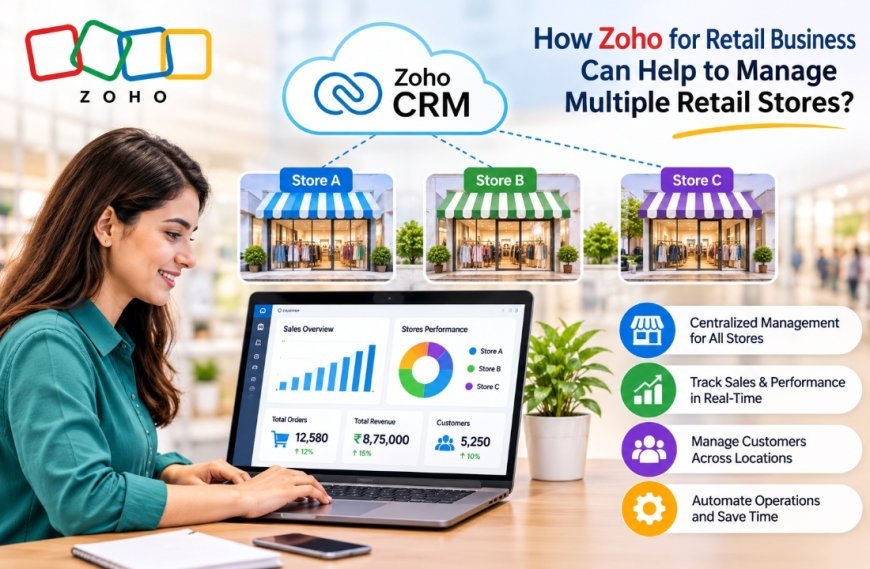
Zoho for Retail Business helps retailers manage multiple store locations by connecting inventory, sales, customers, employees, and daily operations through a centralized system. As a retail business expands to more locations, managing these activities becomes increasingly complex. Retailers often struggle to track inventory across stores, monitor individual store performance, maintain customer records, and keep operations running smoothly.
Without a centralized management system, vital information may be scattered across different software applications and spreadsheets. This makes it difficult for managers to monitor business activities and respond quickly to operational problems.
With Zoho for Retail Business, retailers can connect key business processes through inventory management, customer relationship management, accounting, reporting, and workflow automation applications. With proper configuration, businesses can improve visibility across all locations and streamline day-to-day operations.
Why Managing Multiple Retail Locations Is Becoming Difficult
When a retail business grows and opens stores, running each spot on its own system can cause real headaches. Here are some of the problems:
Hard to Keep Track of Stock Across Stores
It gets messy when every store keeps its own stock list. Owners may find it hard to know what is on hand, follow how goods move around, and avoid having too much or too little.
Say one shop sits on goods while another runs short. Without one view of stock, spotting this and moving items between stores can eat up a lot of time.
Reports on Sales and Store Performance Do Not Match Up
Store owners want to know how each spot is doing. Gathering sales numbers from every branch by hand can slow down reporting.
When reports are not combined, it is tough to compare income, spot-selling items, and see how each store is doing. That can throw off buying choices and plans for the business.
Customer Details Live in Different Places
Shoppers may drop by branches or buy online. When each store keeps its customer records, staff may not see the full picture.
That makes it hard to follow what a person has bought before, handle their questions, and give them the service every time.
Manual Work and Gaps in Talking to Each Other
A lot of retailers still lean on spreadsheets, emails, and manual updates to keep things in sync. These habits can slow down approvals, stock updates, purchase orders, and messages between teams. As stores open, keeping the same way of doing things gets harder and harder.
How Zoho Helps Retail Businesses Manage Multiple Locations
A connected business management system can help retailers organize operations across branches. Zoho provides applications that support inventory, customer, reporting, and automation.
Centralized Inventory Management With Zoho Inventory
Inventory visibility is essential for retailers operating locations. Zoho Inventory provides inventory management tools that help businesses track products, watch stock movements, manage orders, and keep inventory records.
Retailers can use its warehouse management tools to organize stock across locations, depending on their account settings and plan.
Key capabilities include:
- Monitor inventory levels across warehouses.
- Track stock movements and transfers.
- Manage purchase and sales orders.
- Receive alerts for low-stock situations.
- Keep sight of product availability.
For example, if one branch runs low on a product while another has stock, management can review inventory data and plan a transfer accordingly.
Customer Management With Zoho CRM
Customer relationships play an important role in retail growth. Zoho CRM helps retailers organize customer data, manage sales activities, and track customer interactions.
By keeping separate customer records for every branch, businesses can create a more centralized approach to customer management.
Retail teams can use Zoho CRM to:
- Keep customer contact information.
- Track customer inquiries and interactions.
- Manage sales opportunities and follow-ups.
- Organize customer communication.
- Review customer-related activities.
This helps retailers maintain customer visibility and provide more consistent service across different locations.
Streamlined Retail Operations Through Automation
Manual processes can take time, especially when managers coordinate multiple branches. Zoho applications support workflow automation that can cut administrative work. Retailers can set up workflows for notifications, task assignments, record updates, and approval steps based on their business needs.
For example, a business can set notifications when inventory hits a threshold or assign follow-up tasks when a customer inquiry arrives.
Real-Time Business Insights With Zoho Analytics
Retail managers need information to see which locations perform well and where improvements are needed.
Zoho Analytics helps businesses analyze data from sources and create reports and dashboards.
Retailers can use reporting to understand:
- Store sales performance.
- Revenue trends over time.
- Product sales and demand patterns.
- Inventory performance.
- Business performance across locations.
These insights help management spot gaps and make better business decisions.
Key Benefits of Using Zoho for Multi-Store Retail Management
Implementing Zoho for Retail Business can help retailers improve coordination and visibility across locations.
Centralized Business Control
Retail managers can access business information through relevant Zoho applications. This makes it easier to monitor activities without depending on disconnected records.
Improved Inventory Accuracy
Better inventory tracking helps retailers understand product availability, identify stock shortages, and plan inventory movements between locations.
Better Customer Experience
Centralized customer information helps retail teams understand customer interactions and maintain consistent communication across branches.
Faster Business Decisions
Reports and dashboards provide insights into sales trends, inventory performance, and store operations. Managers can use this information to identify areas that need attention.
Reduced Manual Work
Workflow automation can simplify tasks, notifications, and administrative processes, allowing employees to focus on important operational activities.
Support for Business Expansion
As retailers open locations, a properly configured Zoho environment can support changing operational requirements through relevant applications, integrations, and customizations.
How Zoho Supports Both Physical Stores and E-commerce Operations
A lot of shops these days sell both in person and on the web. Running those two sides on their own can lead to headaches. Stock counts get out of sync. Customer details get scattered. Orders get messy.
Zoho for E-commerce can link the selling side with the rest of the shop's day-to-day work.
Say a shop owner wants to hook up their web store with the tools they use for stock and customer info. Zoho integrations can do that.
This can help a business:
-
Keep track of web orders and buyer details.
-
Get a view of what is in stock.
-
Keep stock numbers in step across every place they sell.
-
Sort out customer questions. Follow up on them.
-
Look at how the businesss doing both on the web and in the store.
Take a shop with physical locations and a web store. Linking the tools can close the gaps in information. It can also help the teams work together better.
What the setup looks like depends on the web platform, what needs to be connected, and which Zoho apps are in play.
Practical Example: Managing Three Retail Stores Using Zoho
I am thinking about a business that runs three stores in different places. Every store sells the same kind of products, but each one faces a different amount of customer demand and needs different amounts of inventory.
Store A has more stock of one particular item than it needs. Store B, on the other hand, does not have enough of that same item. Store C sees a need for a different group of products.
If the retail business does not have a view of all inventory at once, the managers will have to call each store separately to find out what is in stock.
With Zoho Inventory, the retail business can put all inventory data into one place organized by each warehouse. The retail business can then check which items are available. After seeing the numbers, the retail business can decide which items to move from one store to another so that the retail business meets the needs of all stores.
At the same time, Zoho CRM can keep all customer details safe. Zoho Analytics can also give the retail business reports that show how sales compare among the three stores.
This connected method lets the managers work together better. Makes it easier for the managers to make smarter decisions.
Which Zoho Applications Are Useful for Managing Multiple Retail Stores?
Retail business applications vary from one retail organization to another. The following Zoho applications can assist retailers in managing inventory, customers, finances, reporting, and day-to-day workflows across various locations.
1. Zoho Inventory
Retailers can use Zoho Inventory's multi-warehouse solution to keep track of stock availability, sales and purchase orders, and inventory movements across multiple stores, and ensure that they have better inventory control.
2. Zoho CRM
Zoho CRM for retail businesses allows you to centralize customer information, track interactions with customers, manage sales activities, and follow up with them. It enables teams in different locations to have uniform customer relationships.
3. Zoho Analytics
Retailers can leverage Zoho Analytics for analyzing their sales performance, revenue trends, inventory, and even store-wise business activities using reports and dashboards. These insights can help with better planning and business decisions.
4. Zoho Books
Zoho Books is a solution that enables retailers to handle finances, like invoicing, expenses, payments, and accounting records. Businesses can keep an eye on financial transactions and have a clearer picture of their finances.
5. Zoho Creator
Retailers can create their own apps as per their business needs with Zoho Creator. Retail solutions for businesses can be developed for store operations, internal approvals, stock requests, employee workflows, and more.
6. Zoho Flow
Zoho Flow links multiple business applications to automate information sharing between business applications. Retailers can establish workflows that minimize manual data entry, automate communications, and synchronize operations throughout linked systems.
Selecting the right Zoho Apps
Not all retailers need all the applications. Choosing the right combination is as much dependent on store operations, the size of the business, software used, and the need for integration. With a well-designed Zoho setup, various aspects of the business can be connected, and multi-store management can be streamlined.
How Retail Businesses Can Implement Zoho for Multi-Store Operations
Successful implementation starts with understanding existing business processes and identifying areas that need improvement.
Step 1: Evaluate Existing Retail Operations
I identify challenges related to inventory, sales, customer management, accounting, and communication between locations.
Step 2: Select the Right Zoho Applications
I choose Zoho products based on business requirements and consider which applications can address existing operational problems.
Step 3: Configure Store-Wise Operations
I set up warehouses, user roles, inventory processes, and workflows to support different Retail locations.
Step 4: Integrate Existing Business Systems
I connect e-commerce platforms, accounting systems, and other business applications where required.
Step 5: Monitor and Optimize Performance
I review reports, evaluate performance, and improve workflows as business requirements change.
Why Choose Vision Infotech for Zoho Retail Solutions?
Choosing the right technology is only one part of improving retail operations. Businesses also need proper configuration, integration, and ongoing technical support.
Vision Infotech helps businesses identify suitable Zoho applications based on their operational requirements. From inventory and customer management to application integration and workflow automation, the focus is on creating solutions that support everyday retail activities.
Whether you operate multiple physical stores, an online retail business, or both, the right Zoho implementation can help connect important business processes.
Explore Zoho for Retail Business to understand how Zoho solutions can support your retail operations.
Conclusion
Managing retail stores becomes simpler when inventory, customer details, sales actions and reports are well organized.
Zoho for Retail Business helps retailers get visibility into their operations. Zoho for E-commerce supports online retail processes. With the apps and integrations, businesses can cut down on manual tasks and handle growing operations more efficiently.
If your retail business needs a management system, look into professional Zoho Consulting Services from Vision Infotech to find the best solution for your needs.
What's Your Reaction?
 Like
0
 Dislike
0
 Love
0
 Funny
0
 Angry
0
 Sad
0
 Wow
0