




















Expert SharePoint Consulting: Improving Collaboration and Business Productivity
Discover how expert SharePoint consulting helps businesses improve document management, team collaboration, workflow automation, security, and Microsoft 365 integration.

Modern businesses need reliable tools to organize information, manage documents, and help employees work together efficiently. Microsoft SharePoint is a widely used platform that supports document management, team collaboration, internal communication, and business process automation.
However, getting the most value from SharePoint requires proper planning, configuration, and ongoing management. Businesses often turn to professional consultants to align the platform with their workflows, security requirements, and long-term technology goals.
What Is SharePoint Consulting?
SharePoint consulting helps organizations plan, implement, customize, and improve their SharePoint environments. Consultants assess existing systems, understand business requirements, and recommend solutions that make information easier to access and manage.
Depending on the organization's needs, consulting services may include:
-
SharePoint implementation and configuration
-
Document management and collaboration solutions
-
Intranet and employee portal development
-
Workflow automation
-
Permissions and access management
-
SharePoint migration and modernization
-
Microsoft 365 integration and user training
A well-planned SharePoint environment can help teams create more consistent processes and reduce the challenges associated with scattered files and disconnected communication tools.
Why Businesses Need Expert SharePoint Consulting
SharePoint offers many features, but configuring them without a clear strategy can lead to confusing site structures, inconsistent permissions, and low user adoption.
Professional consulting helps businesses define how the platform should support their daily operations. Consultants can evaluate existing workflows, identify areas for improvement, and develop a practical implementation plan.
For example, a company with several departments may need separate team sites, shared document libraries, approval workflows, and role-based access controls. A consultant can help organize these components around the company's operational requirements.
Key Services Offered by SharePoint Consultants
SharePoint Implementation and Configuration
A successful implementation begins with understanding business objectives. Consultants can help determine the appropriate site architecture, document libraries, navigation structure, and governance policies.
Proper configuration makes it easier for employees to find relevant information while supporting consistent management across departments.
Document Management and Collaboration
Businesses often store documents across email attachments, local drives, and different cloud platforms. SharePoint can provide a more organized environment for storing, sharing, and collaborating on files.
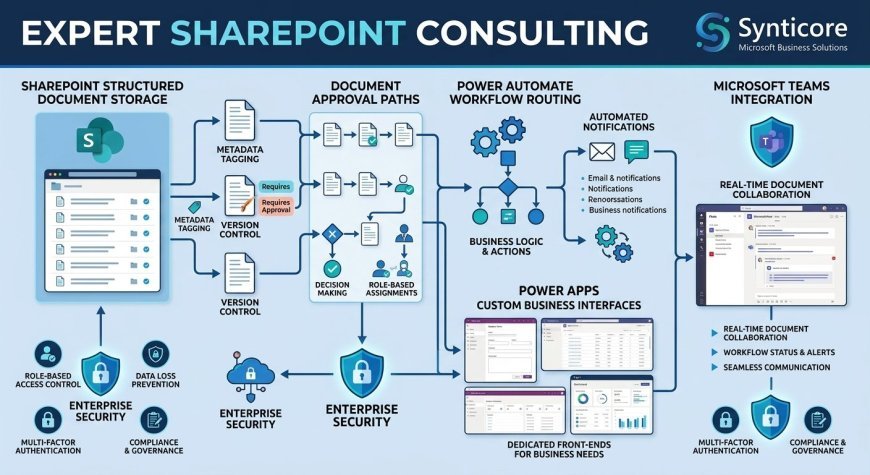
Consultants can help establish document libraries, metadata, version control practices, and access permissions. These features can make document handling more structured and help teams collaborate on shared content.
SharePoint Workflow Automation
Many organizations rely on repetitive tasks such as document approvals, internal requests, and information routing. SharePoint can work with Microsoft Power Automate to automate suitable workflows.
Consultants can help identify processes that are good candidates for automation, design workflow rules, and test the resulting solutions. Automation should be planned carefully so that it simplifies work rather than adding unnecessary complexity.
Intranet and Employee Portal Development
An internal SharePoint portal can provide employees with access to company announcements, policies, department resources, and frequently used documents.
A thoughtfully designed intranet improves the organization of internal information and gives employees a central place to find relevant resources. Consultants can help plan the portal structure, navigation, permissions, and content management approach.
Expert SharePoint Consulting for Business Transformation
Expert SharePoint consulting helps businesses connect technology decisions with practical operational goals. Rather than simply configuring individual features, consultants can evaluate how employees share information, manage documents, and complete recurring tasks.
For organizations using Microsoft 365, SharePoint can also work alongside tools such as Microsoft Teams, Power Automate, and other Microsoft services. A coordinated approach can help reduce disconnected workflows and create a more consistent digital workplace.
Businesses exploring consulting support can review providers such as Synticore to learn about their Microsoft consulting and business automation capabilities. Before selecting a partner, organizations should confirm that the provider's services, technical experience, and project approach match their specific SharePoint requirements.
SharePoint Security and Governance
Security and governance are important parts of any SharePoint project. Poorly managed permissions can expose sensitive information to the wrong users, while unclear ownership can make sites difficult to maintain.
A structured governance plan should define who can create sites, manage content, approve access, and review permissions. Consultants may also help organizations apply appropriate Microsoft 365 security settings and retention practices.
Businesses should regularly review access permissions, train employees on safe sharing, and ensure that their configuration aligns with applicable internal policies and regulatory obligations.
SharePoint Migration and Modernization
Some organizations need to move files and collaboration sites from older SharePoint environments, network drives, or other document management systems. Migration requires more than copying files from one location to another.
A migration plan should consider content quality, permissions, metadata, integrations, and the needs of end users. Testing and validation help identify problems before the new environment becomes the primary workspace.
Consultants can help plan migration phases, prioritize important content, and prepare employees for changes to their daily workflows.
How to Choose the Right SharePoint Consulting Partner
Selecting a consulting partner requires evaluating both technical capabilities and business understanding. Consider these factors before making a decision:
-
Relevant experience: Ask about similar SharePoint projects and business use cases.
-
Clear project scope: Understand the proposed deliverables, timeline, and responsibilities.
-
Security expertise: Confirm that the provider considers permissions and governance during implementation.
-
Microsoft 365 knowledge: Check whether the consultant understands the other tools your organization uses.
-
Training and support: Ask how employees will be prepared and what support is available after launch.
-
Measurable objectives: Define how success will be evaluated, such as improved document organization or more efficient approval processes.
A suitable partner should explain recommendations clearly and tailor the project to the organization's requirements instead of proposing unnecessary customization.
Conclusion
SharePoint can support document management, team collaboration, internal communication, and workflow automation when it is implemented with a clear strategy. Professional consulting helps businesses plan the platform, manage security, improve usability, and align its features with operational goals.
By assessing business needs, establishing governance, and choosing an experienced consulting partner, organizations can build a SharePoint environment that supports collaboration and long-term productivity. Readmore blogs
What's Your Reaction?
 Like
0
Like
0
 Dislike
0
Dislike
0
 Love
0
Love
0
 Funny
0
Funny
0
 Angry
0
Angry
0
 Sad
0
Sad
0
 Wow
0
Wow
0