






















How to Fix Indexing and Website Performance Issues

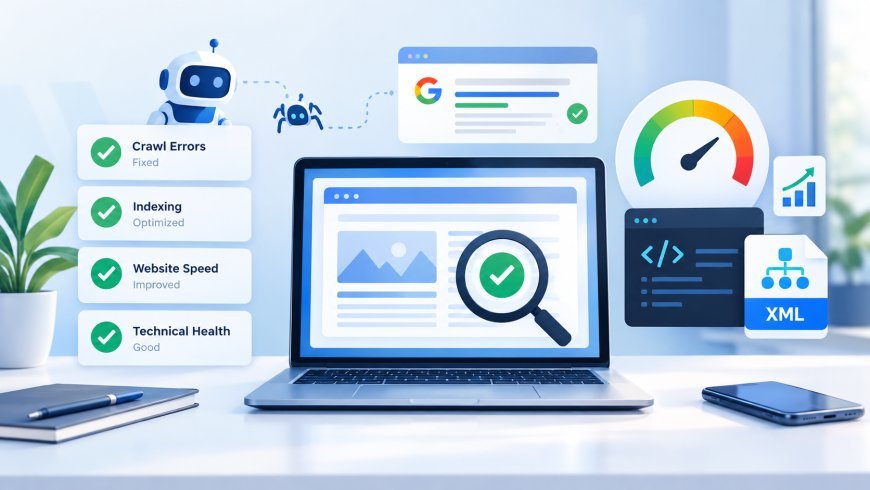
A website can have excellent content and attractive design but still struggle to gain visibility in search engines. When important pages are not indexed or load slowly, potential customers may never discover the information, products, or services they need. These problems can affect organic traffic, user experience, and business growth.
The solution starts with understanding how search engines discover, crawl, render, and index web pages. By identifying technical barriers and improving site performance, businesses can make their websites easier for search engines to access and more useful for visitors.
In this guide, we will explain practical ways to resolve indexing problems, improve website technical health, and implement reliable search engine indexing solutions that support long-term SEO performance.
1. Identify the Root Causes of Website Indexing Issues
Before making changes, determine why your pages are missing from search results. A page that does not appear on Google is not necessarily affected by a technical error. Google may not have discovered it yet, may have selected another URL as the canonical version, or may consider the content insufficiently valuable for indexing.
Start with Google Search Console. Its Page Indexing report helps identify patterns, while the URL Inspection tool provides information about individual URLs, including their indexing status and crawling details.
Common causes include accidental noindex directives, blocked crawling, incorrect canonical tags, server errors, duplicate content, and pages with little original information.
For example, if a recently published service page is missing from Google, inspect the URL before rewriting its content. You might discover that a website setting is preventing search engines from indexing it.
A systematic diagnosis prevents unnecessary changes and helps you focus on the issues affecting your most important pages.
2. Fix Crawl Errors and Improve Search Engine Accessibility
Search engines must be able to access a page before they can properly evaluate its content. Effective crawl error optimization begins with checking whether important URLs return successful HTTP responses and whether search engine bots can access them.
A page returning a 404 error may have been deleted or moved without a suitable replacement. A 5xx server error can indicate hosting problems, resource limitations, or application failures. Redirect chains may also waste crawling resources and create unnecessary delays.
Review your website's robots.txt file to ensure it does not accidentally block important pages or resources. Check page-level robots directives as well, because a noindex tag can prevent a page from appearing in search results.
Remember that robots.txt controls crawling; it is not a reliable way to remove a URL from Google's index. If a page should be excluded from search results, use an appropriate noindex directive while allowing Google to crawl the page and discover that directive.
Also, fix broken internal links and link important pages from relevant sections of your website. Clear navigation helps visitors and search engines discover valuable content.
3. Optimize XML Sitemaps and Internal Linking
An XML sitemap helps search engines discover the URLs you want them to consider for indexing. However, submitting a sitemap does not guarantee that every listed page will be indexed.
Your sitemap should contain the preferred, canonical URLs of valuable pages that you want to appear in search results. Remove redirected URLs, broken pages, and URLs that should not be indexed. If your website uses a content management system, check that its sitemap updates when pages are published, modified, or removed.
After correcting the sitemap, submit it through Google Search Console and monitor its processing status.
Internal linking is equally important. Pages that are buried deep within the website or have no internal links pointing to them may be harder to discover. Connect relevant blog articles, service pages, and supporting resources using descriptive anchor text.
For example, a blog post about website speed can link to a technical SEO service page when the connection genuinely helps readers. This creates a logical path between informational content and relevant business services.
Together, clean sitemaps and useful internal links provide practical search engine indexing solutions by improving URL discovery and clarifying your website's structure.
4. Improve Website Speed and Core Web Vitals
Website performance affects how visitors interact with your content. Slow-loading pages can frustrate users, reduce engagement, and make important information harder to access. On large websites, persistent server delays can also limit crawling efficiency.
Start by testing key landing pages with Google PageSpeed Insights. Review the recommendations and prioritize issues that affect real users instead of making changes simply to achieve a perfect score.
Pay particular attention to three Core Web Vitals:
- Largest Contentful Paint (LCP): Measures loading performance. Aim for 2.5 seconds or less.
- Interaction to Next Paint (INP): Measures responsiveness. Aim for 200 milliseconds or less.
- Cumulative Layout Shift (CLS): Measures visual stability. Aim for a score of 0.1 or less.
These thresholds indicate good user experience when measured at the 75th percentile of page visits.
To improve performance, compress large images, use modern image formats, enable appropriate browser caching, and reduce unnecessary JavaScript and CSS. A content delivery network may help deliver assets efficiently to users in different locations.
Review your hosting environment too. If the server takes too long to respond, image compression alone will not solve the problem. Performance improvements should address the actual bottleneck, whether it comes from the server, page resources, or browser rendering.
5. Strengthen Website Technical Health and Content Quality
Strong website technical health requires more than fixing isolated errors. Your website should have a consistent URL structure, mobile-friendly layouts, secure HTTPS connections, and clear signals that help search engines understand each page.
Canonical tags are especially important when similar content is accessible through multiple URLs. A correctly implemented canonical tag indicates your preferred version, although search engines may select a different canonical URL when other signals disagree.
Check that important pages contain unique title tags, descriptive headings, useful text, and relevant metadata. If your website relies heavily on JavaScript, verify that essential content and links are available when Google renders the page.
Content quality also matters. A technically accessible page is not guaranteed to be indexed. Pages that provide little original value, repeat existing information, or serve no clear user need may struggle to earn a place in search results.
Improve these pages by adding practical examples, answering specific customer questions, clarifying search intent, and removing unnecessary repetition. Use structured data where appropriate and ensure the markup accurately reflects the visible page content.
A combination of sound technical implementation and useful content gives search engines stronger reasons to understand and potentially index your pages.
6. Monitor Results and Maintain Long-Term SEO Performance
Technical SEO is an ongoing process rather than a one-time project. After fixing indexing or performance problems, verify the changes and monitor their impact.
Use the URL Inspection tool to test corrected pages and request indexing when appropriate. For broader issues, monitor the Page Indexing report, Core Web Vitals report, and server logs. Track organic clicks, impressions, and relevant queries in Search Console to understand whether visibility changes over time.
Keep in mind that requesting indexing does not guarantee immediate inclusion in search results. Google determines when to recrawl pages and whether they qualify for indexing.
Create a regular maintenance routine to check broken links, redirect chains, sitemap accuracy, server reliability, and performance on important landing pages. Repeat performance tests after major design changes, plugin updates, migrations, or new tracking scripts.
For businesses managing many pages, prioritize fixes based on business value. A blocked service page or a slow page generating qualified leads deserves attention before a low-value URL that receives little traffic.
If recurring errors remain difficult to diagnose, a professional technical SEO audit can uncover deeper problems involving crawling, rendering, indexation, and site architecture.
Conclusion
Fixing indexing and website performance issues requires a structured approach that combines accurate diagnosis, accessible pages, clean internal linking, faster loading times, and valuable content.
By prioritizing crawl error optimization, strengthening website technical health, and applying effective search engine indexing solutions, businesses can create a more reliable foundation for organic search visibility.
The most effective strategy is to identify the underlying cause, implement the right correction, and monitor the results consistently. With regular technical maintenance and a user-focused approach, your website can become easier to crawl, more efficient to use, and better positioned to earn relevant search traffic.
What's Your Reaction?
 Like
0
Like
0
 Dislike
0
Dislike
0
 Love
0
Love
0
 Funny
0
Funny
0
 Angry
0
Angry
0
 Sad
0
Sad
0
 Wow
0
Wow
0