






















What Are the Risks of Using Free Online Conversion Tools?

Converting files online has become a convenient way to manage documents, images, audio, and videos without installing additional software. Whether you need to change a Word document into a PDF, convert JPG images into PNG files, or prepare a video for another device, free online conversion tools can save time and effort.
However, convenience should not come at the expense of security. Not every file converter follows responsible privacy and security practices. Some websites may collect uploaded information, expose sensitive files, display misleading advertisements, or distribute malicious downloads.
Understanding the potential risks of online converters can help you make better decisions before uploading your files. The good news is that you do not have to avoid online conversion altogether. You simply need to understand what to look for and how to protect your information.
1. Privacy Risks When Uploading Personal Files
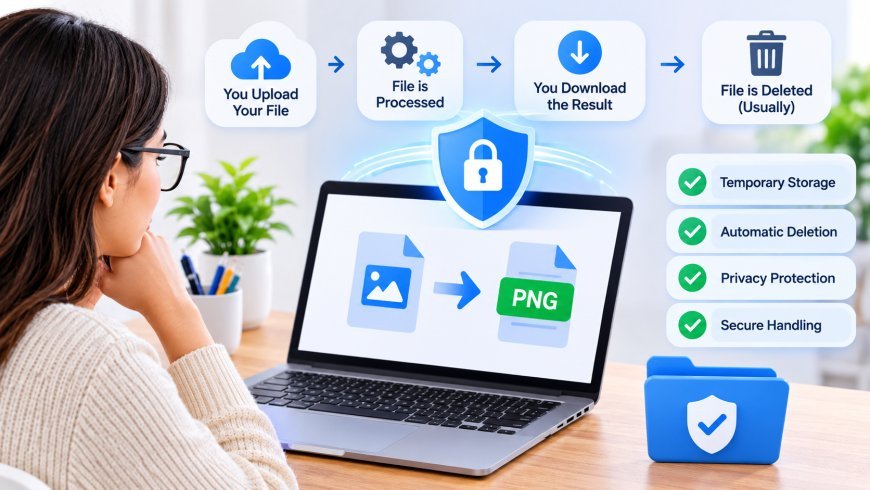
One of the biggest concerns with free online conversion tools is file privacy. Many converters require users to upload documents, images, or other files to a remote server before processing them.
Once a file leaves your device, you are relying on the service provider to handle it responsibly. Depending on its privacy practices, the website may temporarily store uploaded files, retain them longer than expected, or process information in ways users do not fully understand.
For example, a document might contain personal addresses, financial details, business information, or confidential conversations. Even when the purpose is simply to change its format, uploading that document to an unknown website creates unnecessary exposure.
These file upload privacy concerns are particularly important for freelancers, students, professionals, and businesses that regularly handle sensitive information.
Before uploading anything, check the website's privacy policy. Look for clear information about file storage, processing methods, data retention, and deletion procedures.
2. Malware and Suspicious File Downloads
Another serious risk involves malware. Some fraudulent websites pretend to offer free file conversion services but use the process to distribute harmful software.
In March 2025, the FBI's Denver Field Office warned about scams involving online document converters. According to the warning, cybercriminals were using fake conversion services to distribute malware, including ransomware, and steal sensitive information.
The danger is that a suspicious converter might actually complete the conversion, making the website appear legitimate. However, the downloaded file or additional software may contain malicious code.
Other warning signs include unexpected download buttons, forced browser extensions, software installation requests, and pop-up messages claiming your device is infected.
To reduce this risk, avoid downloading unknown converter applications or installing extensions simply because a website recommends them. Keep your browser and security software updated, and scan downloaded files before opening them.
A successful conversion does not automatically mean the resulting file is safe.
3. Hidden Advertisements and Misleading Download Buttons
Free services often use advertisements to support their operations. Advertising itself is not necessarily dangerous, but poorly managed advertisements can create security and usability problems.
Some websites display multiple download buttons, promotional banners, or pop-ups that make it difficult to identify the actual converted file. A user may accidentally click an advertisement instead of the intended download option.
These misleading elements can redirect visitors to unrelated websites, suspicious software downloads, or phishing pages.
For example, imagine converting a PDF into a Word document. After processing, the website displays several large buttons labeled Download. Only one may lead to the actual converted document, while others redirect to external services.
A trustworthy converter should make the conversion process straightforward. Important actions, such as uploading, converting, and downloading, should be clearly labeled.
Avoid clicking unexpected pop-ups, promotional offers, or buttons that request unnecessary permissions.
4. Poor File Quality and Unexpected Conversion Errors
Security is not the only concern when using free online conversion tools. File quality is another important factor.
Some converters may change the original formatting, reduce image resolution, affect audio quality, or remove information during processing. The results can be particularly frustrating when working with professional documents, presentations, or important media files.
For instance, converting a PDF into an editable document might change fonts, spacing, tables, or page layouts. Similarly, converting an image into another format may affect transparency, compression, or visual details.
Video and audio conversions can also produce unexpected results if the tool uses unsuitable encoding settings.
To avoid these problems, choose a converter that supports your required file formats and provides appropriate output settings. Whenever possible, keep a backup of the original file and review the converted version before using or sharing it.
A reliable conversion process should preserve as much of the original file's quality and information as possible.
5. How to Choose a Safer Online File Converter
Not all free converters are unsafe. Many legitimate services provide useful conversion features while taking reasonable steps to protect users and their files.
The key is knowing how to evaluate a website before trusting it with your information.
Consider these important factors:
-
HTTPS protection: Check whether the website uses a secure HTTPS connection when accessing and uploading files.
-
Transparent privacy policy: Look for clear explanations of how uploaded files are processed, stored, and deleted.
-
No unnecessary installations: Prefer browser-based tools that do not require suspicious software downloads or extensions.
-
Supported file formats: Make sure the service clearly explains which input and output formats it supports.
-
Simple download process: Avoid websites with misleading advertisements, suspicious redirects, or excessive pop-ups.
-
Clear ownership and contact information: A legitimate service should provide accessible information about its operation and support.
Remember that HTTPS alone does not guarantee that a website is trustworthy. It protects the connection, but it does not prove that the service handles your files responsibly.
Taking a few moments to evaluate a converter can help prevent unnecessary privacy and security problems.
6. Safe Ways to Convert Files Online
You can enjoy the convenience of online conversion while reducing potential security risks by following a few practical habits.
First, avoid uploading confidential documents to unfamiliar websites. If a file contains passwords, banking information, private business records, or personal identification details, consider using a trusted offline application or an organization-approved conversion service.
Second, review the website's privacy practices before uploading files. Pay particular attention to whether processing happens directly in your browser or on the provider's servers.
Third, keep your original files backed up. This gives you a reliable copy if the conversion fails, changes the formatting, or produces an unexpected result.
You should also scan downloaded files with updated security software and avoid opening unexpected attachments or executable downloads.
For everyday conversion tasks, a browser-based service with transparent privacy information can be a practical option.
For example, Easy Converter provides free online conversion tools for images, audio, documents, and video. Many image, audio, and document conversions are processed locally in your browser, while video conversions are handled on a secure server. This distinction helps users understand how different conversion tasks are processed.
Before using any service, including a browser-based converter, review its privacy information and choose the processing method appropriate for your files.
Final Thoughts
Free online conversion tools can make everyday file management much easier, but users should not overlook the potential security and privacy risks. Data exposure, malware, misleading advertisements, and conversion errors are all issues worth considering before uploading a file.
The safest approach is to choose transparent services, understand their file-processing methods, avoid uploading sensitive information unnecessarily, and scan downloaded files before opening them.
You do not need expensive software for every conversion task. With a little caution and the right tools, you can convert images, documents, audio, and videos conveniently while making more informed decisions about your digital privacy.
What's Your Reaction?
 Like
0
 Dislike
0
 Love
0
 Funny
0
 Angry
0
 Sad
0
 Wow
0