

























AI Calling Agent vs IVR vs Human: What to Use and When
Compare AI calling agents, IVR systems, and human agents to understand their differences, benefits, costs, and best use cases. Learn how businesses can combine all three to improve customer service and automate routine calls with OnDial AI.
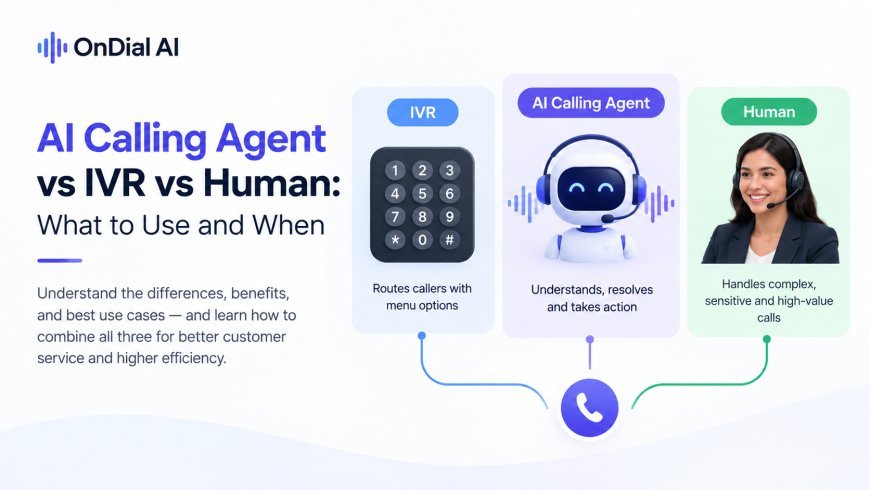
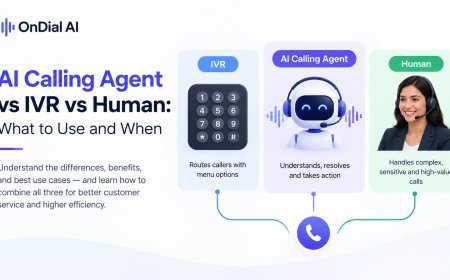
In the AI calling agent vs IVR debate, the short answer is that they do different jobs. An IVR (the "press 1 for billing" menu) sorts callers. An AI calling agent understands what callers say and resolves routine requests. Human agents handle anything that needs judgment, empathy or negotiation. Most businesses get the best results by using all three in layers, not by picking one.
This guide compares the three side by side, shows where each one still wins (including a few cases where the old IVR beats AI), and lays out a practical blueprint for combining them, with a step-by-step plan for moving off a legacy menu.
What does each option actually do?
Each option answers a different question about a call. An IVR asks "which queue does this belong in?" The AI agent asks "can I solve this now?" A human agent asks "what does this person really need?"
|
IVR |
AI calling agent |
Human agent |
|
|
How callers interact |
Keypad presses or a few fixed spoken words |
Natural speech, in their own words |
Natural conversation |
|
Main job |
Route callers and play recorded information |
Understand, resolve and act on routine requests |
Handle complex, sensitive and high-value calls |
|
Can it complete tasks? |
Only simple, pre-built ones |
Yes, through integrations (booking, CRM updates, lookups) |
Yes, including exceptions |
|
Handles unexpected requests |
No, falls back to "please choose from the following" |
Partly, then hands off |
Yes |
|
Capacity |
Many calls at once |
Many calls at once |
One call per person |
|
Availability |
Around the clock |
Around the clock |
Staffed hours |
|
Cost per extra call |
Very low |
Low, usually per minute |
High, mostly salary and overhead |
|
Setup and changes |
Menu trees, often needing IT or the telecom provider |
Flows, knowledge and rules, often no-code |
Hiring and training |
|
What callers dislike |
Long menus, dead ends |
Errors, not reaching a person |
Wait times |
Where IVR still makes sense
IVR is older technology, but it isn't useless. It still wins in a handful of situations, and most comparisons skip them.
-
Secure keypad entry. Entering a PIN or card number with the keypad, with tones masked from recordings, is a well-understood way to keep sensitive numbers out of transcripts.
-
Very simple, high-volume routing. If 90% of callers only need to choose between two departments, a two-option menu is cheap and fast.
-
Fixed announcements. Outage notices, holiday hours and emergency messages that every caller should hear first.
-
Strict, predictable flows. Some regulated processes require the exact same wording every time, with no variation at all.
-
Tight budgets with low volume. A basic menu costs very little to run.
If your phone line looks like this, there's no need to rip out the IVR. The question is what happens after the menu.
Where conversational AI wins
AI wins whenever callers have a specific, routine need that a menu can't solve. Instead of five layers of options, the caller says "I need to move my Thursday appointment," and the agent does it.
-
Routine requests with a clear answer: order status, balances, opening hours, claim status.
-
Tasks that need an action: booking, rescheduling, updating details, logging a request.
-
Calls where speed matters: new sales enquiries and after-hours calls that would otherwise go to voicemail.
-
Callers who don't fit the menu: people who explain their problem in their own words, in their own language.
Published results from teams that replaced a menu with conversational AI show the scale of the change. In two anonymized case studies, OnDial reports that a regional telecom operator cut live agent load by 60% after replacing its legacy routing menu for tier-one support, and a property and casualty insurer cut live agent load by 70% after replacing numeric routing on claim calls. Details are in the telecom call center automation case study and the insurance claims case study. These are vendor-reported figures, so treat them as examples rather than benchmarks.
Where human agents win
People win wherever the right answer isn't in a system. That covers more calls than automation vendors like to admit.
-
Complaints and upset customers. Someone who's angry needs to feel heard before anything gets solved.
-
Negotiation and sales. Pricing exceptions, objections and closing a deal need judgment.
-
Unusual situations. A request that combines three issues, or a problem nobody has seen before.
-
Sensitive conversations. Medical worries, bereavement, financial hardship.
-
High-value relationships. Key accounts often expect a named person.
Labor is the largest cost in any phone operation. Gartner has noted it can make up as much as 95% of contact center costs (Gartner, 2022). That's exactly why human time should go to these calls and not to reading out opening hours.
AI calling agent vs IVR vs human: what to use when
Match the tool to the call, not the other way round. Here's how common call types usually split:
|
Call type |
Best handled by |
Why |
|
Choosing between two or three departments |
IVR or AI |
Simple routing; AI if callers often pick the wrong option |
|
Order, claim or delivery status |
AI agent |
Clear answer that lives in a system |
|
Booking or rescheduling appointments |
AI agent |
Rule-based once connected to a calendar |
|
Entering a card number or PIN |
IVR keypad entry, or a secure payment link |
Keeps sensitive digits out of transcripts |
|
New sales enquiry after hours |
AI agent |
Speed matters and no one is on shift |
|
Billing dispute or complaint |
AI triage, then human |
AI gathers details; a person resolves |
|
Negotiating terms or pricing |
Human |
Needs judgment and authority |
|
Emergency or safety issue |
Human, immediately |
Risk is too high for automation |
|
Outage or holiday announcement |
IVR |
Same message for everyone |
How to layer all three into one phone system
A layered design gives each tool the job it's best at. Here's a blueprint that works for most mid-sized businesses:
-
Front door (optional IVR): a short announcement if needed, plus a language choice or a single "press 1 for emergencies" option. Keep it under 15 seconds, or skip it.
-
Conversation layer (AI agent): greets the caller, asks how it can help, and resolves routine requests on the spot.
-
Secure input (IVR or payment link): when a card number or PIN is needed, the call switches to masked keypad entry or sends a secure link.
-
Escalation layer (human agents): complex, emotional or high-value calls transfer to the right team, with the full conversation passed along so the caller doesn't repeat anything.
-
Fallback: if no person is free, the AI takes a detailed message or books a callback instead of leaving the caller on hold.
The weak point in any layered system is the handoff between layers. If a caller explains their problem to the AI and then has to explain it again to a person, you've combined the worst of both. Test handoffs more than anything else.
How to move from an IVR to conversational AI
You don't need a big-bang switch. A phased move keeps the old menu as a safety net until the new system proves itself.
-
Audit your current menu. Pull call data and note which options get pressed most, where callers press zero, and where they hang up. Those drop-off points are your first targets.
-
Pick one high-volume branch. For example, "order status" or "appointments," not the whole menu.
-
Connect the systems behind it, such as your order system or calendar, so the AI can act and not just talk.
-
Run it in parallel. Route that one branch to the AI agent while the rest of the menu stays as it is.
-
Measure against the old path. Compare resolution rate, transfers, call length and hang-ups with your audit numbers.
-
Expand branch by branch, and shrink the menu as each branch moves over. Keep a minimal menu only for the jobs IVR still does best.
Reality check: if your calls are few and mostly complex, an AI layer may not add much. A short menu plus well-staffed human lines might be the right answer for now.
Common mistakes when mixing IVR, AI and humans
-
Putting a long menu in front of the AI. Callers who sit through five options and then meet a bot are already annoyed.
-
No obvious way to reach a person. Make "agent" or "speak to someone" work at any point.
-
Letting the AI handle what it shouldn't. Keep emergencies, complaints and sensitive topics on a fast path to people.
-
Measuring calls answered, not calls resolved. An AI that answers everything but solves little just adds a step.
-
Forgetting outbound rules. If the AI also makes outbound calls, consent and disclosure rules apply in most markets, such as the TCPA in the US and TRAI rules in India.
Where OnDial fits
OnDial is an AI calling agent platform for inbound and outbound calls, designed to sit in the conversation layer of the blueprint above. It handles routine calls from your approved knowledge, takes actions through integrations with tools such as Salesforce, HubSpot, Zoho and Calendly, and transfers complex or frustrated callers to your team through warm or cold transfers with the full conversation attached.
Every call produces a transcript, intent, sentiment, summary and outcome for your CRM, which makes it easier to compare performance against your old IVR paths. OnDial reports support for more than 100 languages, including Hindi, Gujarati and Tamil. It's a managed platform rather than a free or self-hosted tool.
Frequently asked questions
What is the difference between an AI calling agent and an IVR?
An IVR routes callers using keypad presses or a few fixed words and plays recorded information. An AI calling agent understands natural speech, answers questions and completes tasks like bookings during the call.
Can an AI calling agent fully replace an IVR?
For most call types, yes, but a minimal IVR can still be useful for secure keypad entry of PINs or card numbers and for fixed announcements. Many businesses keep a short menu alongside the AI.
When should a call go to a human instead of AI?
Send calls to a person when they involve complaints, negotiation, emergencies, sensitive topics or high-value customers, or whenever the caller asks for one. The person should receive the full conversation so far.
Is IVR cheaper than AI calling?
Per call, a basic IVR is usually cheaper to run. But an IVR resolves few calls on its own, so more calls reach paid staff, which often makes the overall cost higher than an AI layer that resolves routine requests.
How do I switch from IVR to AI without disrupting customers?
Move one high-volume menu branch at a time, run it alongside the existing menu, compare results with your old numbers, and expand only when resolution and satisfaction hold.
Start with your busiest menu option
Your IVR data already shows where to begin: the option callers press most and the point where they hang up. If you'd like help mapping that branch to AI, book a demo with the OnDial team.
What's Your Reaction?
 Like
0
Like
0
 Dislike
0
Dislike
0
 Love
0
Love
0
 Funny
0
Funny
0
 Angry
0
Angry
0
 Sad
0
Sad
0
 Wow
0
Wow
0